

Implement call invitation
This doc will introduce how to implement the call invitation feature in the calling scenario.
Prerequisites
Before you begin, make sure you complete the following:
- Complete SDK integration and basic calling functions by referring to Quick start.
- Download the demo that comes with this doc.
- Activate the In-app Chat service.

Preview the effect
You can achieve the following effect with the demo provided in this doc:
| Home Page | Incoming Call Dialog | Waiting Page | Calling Page |
|---|---|---|---|
 |  |  |  |
Understand the tech
Implementation of the call invitation is based on the Call invitation (signaling) feature provided by the in-app chat (hereafter referred to as ZIM SDK), which provides the capability of call invitation, allowing you to send, cancel, accept, and refuse a call invitation.
The process of call invitation implemented based on this is as follows: (taking "Alice calls Bob, Bob accepts and connects the call" as an example)
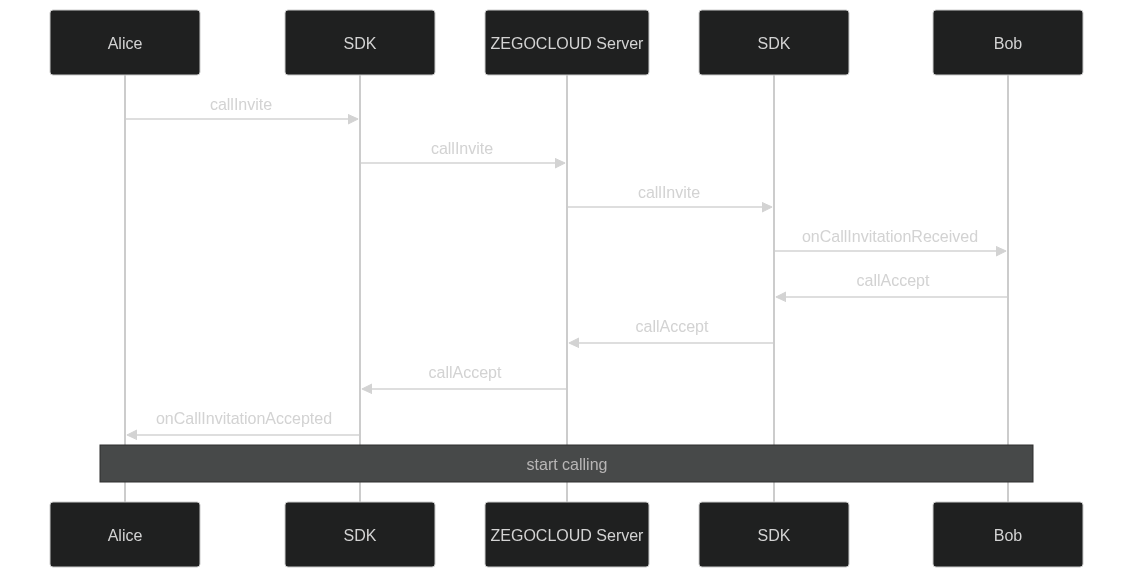
Here is a brief overview of the solution:
-
The caller can send a call invitation to a specific user by calling the
callInvitemethod and waiting for the callee's response.- When the callee accepts the call invitation, the caller will receive a callback notification via
onCallUserStateChanged. - When the callee rejects the call invitation, the caller will receive a callback notification via
onCallUserStateChanged. - When the callee does not respond within the timeout period, the caller will receive a callback notification via
onCallUserStateChanged. - The caller can call
callCancelto cancel the call invitation during the waiting period.
Advanced Mode
you can set advanced mode in
callInvite,in advanced mode:- The caller can call
callQuitto qiut the call invitation. - The caller can call
callEndto end the call invitation. - The caller can call
callingInviteto add callees to exist call invitation.
- When the callee accepts the call invitation, the caller will receive a callback notification via
-
When the callee receives a call invitation, the callee will receive a callback notification via the
onCallInvitationReceivedand can choose to accept, reject, or not respond to the call.- If the callee wants to accept the call invitation, call the
callAcceptmethod. - If the callee wants to reject the call invitation, call the
callRejectmethod. - When the caller cancel the call invitation, the callee will receive a callback notification via
onCallInvitationCancelled. - When the callee does not respond within the timeout period, the callee will receive a callback notification via
onCallInvitationTimeout.
- If the callee wants to accept the call invitation, call the
-
If any callee accepts the invitation, the call will begin.
Later in this document, the complete call process will be described in detail.
void callInvite(List<String> invitees, ZIMCallInviteConfig config, ZIMCallInvitationSentCallback callback);

void callCancel(List<String> invitees, String callID, ZIMCallCancelConfig config, ZIMCallCancelSentCallback callback);

void callAccept(String callID, ZIMCallAcceptConfig config, ZIMCallAcceptanceSentCallback callback);

void callReject(String callID, ZIMCallRejectConfig config, ZIMCallRejectionSentCallback callback);

void callingInvite(List<String> invitees, String callID, ZIMCallingInviteConfig config,ZIMCallingInvitationSentCallback callback);

void callEnd(String callID, ZIMCallEndConfig config, ZIMCallEndSentCallback callback);

void callQuit(String callID, ZIMCallQuitConfig config, ZIMCallQuitSentCallback callback);

void callingInvite(List<String> invitees, String callID, ZIMCallingInviteConfig config, ZIMCallingInvitationSentCallback callback);public void onCallInvitationReceived(ZIM zim, ZIMCallInvitationReceivedInfo info, String callID) {}
public void onCallInvitationCancelled(ZIM zim, ZIMCallInvitationCancelledInfo info, String callID) {}
public void onCallInvitationTimeout(ZIM zim, ZIMCallInvitationTimeoutInfo info, String callID) {}
public void onCallUserStateChanged(ZIM zim, ZIMCallUserStateChangeInfo info, String callID) {}
public void onCallInvitationEnded(ZIM zim, ZIMCallInvitationEndedInfo info, String callID) {}Implementation
Integrate and start to use the ZIM SDK
If you have not used the ZIM SDK before, you can read the following section:
To import the ZIM SDK, do the following:
-
Set up repositories.
-
If your Android Gradle Plugin is v7.1.0 or later: go to the root directory of your project, open the
settings.gradlefile, and add the following line to thedependencyResolutionManagement:... dependencyResolutionManagement { repositoriesMode.set(RepositoriesMode.FAIL_ON_PROJECT_REPOS) repositories { maven { url 'https://maven.zego.im' } mavenCentral() google() } }WarningIf you can not find the above fields in
settings.gradle, it's probably because your Android Gradle Plugin version is lower than v7.1.0.For more details, see Android Gradle Plugin Release Note v7.1.0.
-
If your Android Gradle Plugin is earlier than 7.1.0: go to the root directory of your project, open the
build.gradlefile, and add the following line to theallprojects:... allprojects { repositories { maven { url 'https://maven.zego.im' } mavenCentral() google() } }
-
-
Declare dependencies:
Go to the
appdirectory, open thebuild.gradlefile, and add the following line to thedependencies. (x.y.z is the SDK version number, to obtain the latest version number, see Release Notes.... dependencies { ... implementation 'im.zego:zim:x.y.z' }
After successful integration, you can use the Zim SDK like this:
import im.zego.zim.ZIMCreating a ZIM instance is the very first step, an instance corresponds to a user logging in to the system as a client.
ZIMAppConfig appConfig = new ZIMAppConfig();
appConfig.appID = yourAppID;
appConfig.appSign = yourAppSign;
zim = ZIM.create(appConfig, application);Later on, we will provide you with detailed instructions on how to use the ZIM SDK to develop the call invitation feature.
Manage multiple SDKs more easily
In most cases, you need to use multiple SDKs together. For example, in the call invitation scenario described in this doc, you need to use the zim sdk to implement the call invitation feature, and then use the zego_express_engine sdk to implement the calling feature.
If your app has direct calls to SDKs everywhere, it can make the code difficult to manage and troubleshoot. To make your app code more organized, we recommend the following way to manage these SDKs:
- Create a wrapper layer for each SDK so that you can reuse the code to the greatest extent possible.
Create a ZIMService class for the zim sdk, which manages the interaction with the SDK and stores the necessary data. Please refer to the complete code in ZIMService.java.
public class ZIMService {

    // ...

    public void initSDK(Application application, long appID, String appSign) {
        zimProxy.create(application, appID, appSign);
        // ...
    }
}

class ZIMProxy {

    private SimpleZIMEventHandler zimEventHandler;

    public void create(Application application, long appID, String appSign) {
        ZIMAppConfig zimAppConfig = new ZIMAppConfig();
        zimAppConfig.appID = appID;
        zimAppConfig.appSign = appSign;
        ZIM.create(zimAppConfig, application);

        zimEventHandler = new SimpleZIMEventHandler();
        if (getZIM() != null) {
            ZIM.getInstance().setEventHandler(zimEventHandler);
        }
    }

}Similarly, create an ExpressService class for the zego_express_engine sdk, which manages the interaction with the SDK and stores the necessary data. Please refer to the complete code in ExpressService.java.
public class ExpressService {

    // ...
    public void initSDK(Application application, long appID, String appSign, ZegoScenario scenario) {
        ZegoEngineConfig config = new ZegoEngineConfig();
        config.advancedConfig.put("notify_remote_device_unknown_status", "true");
        config.advancedConfig.put("notify_remote_device_init_status", "true");
        ZegoExpressEngine.setEngineConfig(config);
        engineProxy.createEngine(application, appID, appSign, scenario);
        // ...
    }
}

class ExpressEngineProxy {

    private SimpleExpressEventHandler expressEventHandler;

    public void createEngine(Application application, long appID, String appSign, ZegoScenario scenario) {
        ZegoEngineProfile profile = new ZegoEngineProfile();
        profile.appID = appID;
        profile.appSign = appSign;
        profile.scenario = scenario;
        profile.application = application;
        expressEventHandler = new SimpleExpressEventHandler();
        ZegoExpressEngine.createEngine(profile, expressEventHandler);
    }
}With the service, you can add methods to the service whenever you need to use any SDK interface.
public class ZIMService {
    // ...
    public void connectUser(String userID, String userName, String token,ZIMLoggedInCallback callback) {
        ZIMUserInfo zimUserInfo = new ZIMUserInfo();
        zimUserInfo.userID = userID;
        zimUserInfo.userName = userName;
        zim.login(zimUserInfo,token, new ZIMLoggedInCallback() {
            @Override
            public void onLoggedIn(ZIMError errorInfo) {
                // ...
            }
        });
    }
}- After completing the service encapsulation, you can further simplify the code by creating a
ZEGOSDKManagerto manage these services, as shown below. Please refer to the complete code in ZEGOSDKManager.java.
public class ZEGOSDKManager {
    public ExpressService expressService = new ExpressService();
    public ZIMService zimService = new ZIMService();

    private ZEGOSDKManager(){

    }

    private static final class Holder {
        private static final ZEGOSDKManager INSTANCE = new ZEGOSDKManager();
    }

    public static ZEGOSDKManager getInstance() {
        return Holder.INSTANCE;
    }

    public void initSDK(Application application, long appID, String appSign,ZegoScenario scenario) {
        expressService.initSDK(application, appID, appSign,scenario);
        zimService.initSDK(application, appID, appSign);
    }
}In this way, you have implemented a singleton class that manages the SDK services you need. From now on, you can get an instance of this class anywhere in your project and use it to execute SDK-related logic, such as:
- When the app starts up: call
ZEGOSDKManager.getInstance().initSDK(application,appID,appSign); - When login : call
ZEGOSDKManager.getInstance().connectUser(userID,userName,callback);
Later, we will introduce how to add call invitation feature based on this.
Send a call invitation
- Crete a class to manage CallInvitation messages and callbacks.We send callInvitation by
ZEGOCallInvitationManagerinterfaces and listen to callbacks fromZEGOCallInvitationManager.
For details, see complete source code. The key code is as follows:
public class ZEGOCallInvitationManager {

     private static final class Holder {

         private static final ZEGOCallInvitationManager INSTANCE = new ZEGOCallInvitationManager();
     }

     private ZEGOCallInvitationManager() {

     }

     public static ZEGOCallInvitationManager getInstance() {
         return ZEGOCallInvitationManager.Holder.INSTANCE;
     }

     private IZIMEventHandler zimEventHandler;
     private CallInviteInfo callInviteInfo;

     public void init(Context context) {
         //...
         // zimEventHandler = ...
         //
         ZEGOSDKManager.getInstance().zimService.addEventHandler(zimEventHandler, false);
     }

     public void addCallListener(CallChangedListener listener, boolean autoRemove) {
         if (autoRemove) {
             autoRemoveCallListeners.add(listener);
         } else {
             callListeners.add(listener);
         }
     }

     private void sendCall(List<String> userIDList, boolean video, ZIMCallInvitationSentCallback callback) {
         //...
      }

}- Pass extension information
When the caller initiates a call, not only specifying the callee, but also passing on information to the callee is allowed, such as whether to initiate a video call or an audio-only call.
The ZIMCallInviteConfig parameter of the callInvite method allows for passing a string type of extended information extendedData. This extended information will be passed to the callee. You can use this method to allow the caller to pass any information to the callee.
In the example demo of this solution, you will use the CallInviteExtendedData type to define the extendedData of the call invitation, and you need to convert it to a string in JSON format and pass it to the callee when initiating the call. (See complete source code). The CallInviteExtendedData includes the call type and the name of the caller.
public class CallExtendedData {

    public int type;
    public static final int VIDEO_CALL = 10000;
    public static final int VOICE_CALL = 10001;
}After defining the structure of CallExtendedData, we can use callinvite to send a call request,see complete source code. The key code is as follows:
 private void sendCall(List<String> userIDList, boolean video, ZIMCallInvitationSentCallback callback) {
    if (callInviteInfo == null) {
        callInviteInfo = new CallInviteInfo();
        CallExtendedData extendedData = new CallExtendedData();
        if (video) {
            extendedData.type = CallExtendedData.VIDEO_CALL;
        } else {
            extendedData.type = CallExtendedData.VOICE_CALL;
        }

        ZIMCallInviteConfig config = new ZIMCallInviteConfig();
        config.extendedData = extendedData.toString();
        config.mode = ZIMCallInvitationMode.ADVANCED;
        ZEGOSDKManager.getInstance().zimService.sendUserRequest(userIDList, config,...);
    } else {
        if (!TextUtils.isEmpty(callInviteInfo.requestID)) {
            ZIMCallingInviteConfig config = new ZIMCallingInviteConfig();
            ZEGOSDKManager.getInstance().zimService.addUserToRequest(userIDList, callInviteInfo.requestID, config,...);
        }
    }
}Note: The caller needs to check the
errorInfoinonCallInvitationSentto determine if the call is successful and handle exception cases such as call failure due to network disconnection on the caller's phone.
-
After Send Call In our example demo, if the call is a 1v1 call, after sending the request, we will enter a waiting page. If it is a group call, after sending the request, we will directly enter the call page, which is convenient for displaying the call status of everyone. (See complete source code)
 ZEGOCallInvitationManager.getInstance().inviteVideoCall(Arrays.asList(split), new ZIMCallInvitationSentCallback() {
     @Override
     public void onCallInvitationSent(String requestID, ZIMCallInvitationSentInfo info,
         ZIMError errorInfo) {
         if (errorInfo.code.value() == 0) {
             if (split.length > 1) {
                 Intent intent = new Intent(MainActivity.this, CallInvitationActivity.class);
                 startActivity(intent);
             } else {
                 Intent intent = new Intent(MainActivity.this, CallWaitActivity.class);
                 startActivity(intent);
             }
         }
     }
 });
-
In the 1v1 calling scenario, As a caller, after initiating the call, you will enter the call waiting page, where you can listen to the status changes of the call. See complete source code for details. The key code is as follows:
public class CallWaitActivity extends AppCompatActivity { private CallChangedListener listener; @Override protected void onCreate(Bundle savedInstanceState) { super.onCreate(savedInstanceState); // ... ZEGOCallInvitationManager.getInstance().addCallListener(listener); // ... } } -
When the callee accepts the call invitation, you will enter the calling page and the call starts.
public class CallWaitActivity extends AppCompatActivity { @Override protected void onCreate(Bundle savedInstanceState) { super.onCreate(savedInstanceState); // ... listener = new CallChangedListener() { //... @Override public void onInvitedUserAccepted(String requestID, CallInviteUser acceptUser) { ZEGOSDKUser currentUser = ZEGOSDKManager.getInstance().expressService.getCurrentUser(); if (Objects.equals(acceptUser.getUserID(), currentUser.userID)) { return; } if (requestID.equals(callInviteInfo.requestID)) { Intent intent = new Intent(CallWaitActivity.this, CallInvitationActivity.class); startActivity(intent); finish(); } } }; // ... } } -
When the callee refuses the call invitation, you will return to the previous page and the call ends. Similarly, when the callee doesn't respond within the timeout, the call ends and returns to the previous page.
public class CallWaitingActivity extends AppCompatActivity { @Override protected void onCreate(Bundle savedInstanceState) { super.onCreate(savedInstanceState); // ... zimEventHandler = new IZIMEventHandler() { @Override public void onCallEnded(String requestID) { if (requestID.equals(callInviteInfo.requestID)) { finish(); } } } // ... } } -
After initiating a call, the caller can end the call at any time by calling the
callEndmethod.
In the
callEndmethod, you are required to pass acallID.callIDis a unique identifier for a call invitation that can be obtained from theZIMCallInvitationSentCallbackparameter of thecallInvitemethod.
public class CallWaitingActivity extends AppCompatActivity {
    // ...
    @Override
    protected void onCreate(Bundle savedInstanceState) {
        // ...
        binding.outgoingCallCancelButton.setOnClickListener(v -> {
             ZegoCallInvitationManager.getInstance().endCallRequest(callInfo.callID, callInfo.calleeUserID, new UserRequestCallback() {
                    @Override
                    public void onUserRequestSend(int errorCode, String requestID) {
                        if (errorCode == 0) {
                            finish();
                        } else {
                            ToastUtil.show(CallWaitActivity.this, "send reject failed :" + errorCode);
                        }
                    }
                });
        });
        // ...
    }
    // ...
}- In the group call scenario, as a caller, after initiating the call, you will enter the calling page, where you can listen to the status changes of the all the callees. See complete source code for details.The key code is as follows:
callChangedListener = new CallChangedListener() {

    @Override
    public void onInvitedUserRejected(String requestID, CallInviteUser rejectUser) {

        updateLayoutVisibility();

        updateCellViewParams();
    }

    @Override
    public void onInvitedUserTimeout(String requestID, CallInviteUser timeoutUser) {
        updateLayoutVisibility();

        updateCellViewParams();
    }

    @Override
    public void onInvitedUserQuit(String requestID, CallInviteUser quitUser) {
        updateLayoutVisibility();

        updateCellViewParams();
    }

    @Override
    public void onInvitedUserAccepted(String requestID, CallInviteUser acceptUser) {
        updateLayoutVisibility();

        updateCellViewParams();
    }

    @Override
    public void onCallEnded(String requestID) {
        if (!isDisplayPip()) {
            removeAllCellViews();
        }
        binding.layoutFlexbox.setVisibility(GONE);
        binding.layoutPip.setVisibility(VISIBLE);
    }

    @Override
    public void onCallCancelled(String requestID) {
        if (!isDisplayPip()) {
            removeAllCellViews();
        }
        binding.layoutFlexbox.setVisibility(GONE);
        binding.layoutPip.setVisibility(VISIBLE);
    }

    @Override
    public void onCallTimeout(String requestID) {
        updateLayoutVisibility();
        updateCellViewParams();
    }

    @Override
    public void onInviteNewUser(String requestID, CallInviteUser inviteUser) {
        updateLayoutVisibility();
        updateCellViewParams();
    }
    };
ZEGOCallInvitationManager.getInstance().addCallListener(callChangedListener);- when there are any waiting or accepted callees in the call invitation, the call is in progress, otherwise, you will return to the previous page and the call ends.
// ZEGOCallInvitationManager.java
private void checkIfCallEnded() {
    if (callInviteInfo == null) {
        // already end
        return;
    }
    boolean shouldEndCall = true;
    ZEGOSDKUser currentUser = ZEGOSDKManager.getInstance().expressService.getCurrentUser();
    for (CallInviteUser callInviteUser : callInviteInfo.userList) {
        if (!Objects.equals(callInviteUser.getUserID(), currentUser.userID)) {
            // except self
            if (callInviteUser.isAccepted() || callInviteUser.isWaiting()) {
                shouldEndCall = false;
            }
        }
    }
    if (shouldEndCall) {
        for (CallChangedListener listener : callListeners) {
            listener.onCallEnded(callInviteInfo.requestID);
        }
        for (CallChangedListener listener : autoRemoveCallListeners) {
            listener.onCallEnded(callInviteInfo.requestID);
        }
        quitCallAndLeaveRoom();
    }
}
//CallInvitationActivity.java:
ZEGOCallInvitationManager.getInstance().addCallListener(new CallChangedListener() {
    @Override
    public void onCallEnded(String requestID) {
        Timber.d("onCallEnded() called with: requestID = [" + requestID + "]");
        finish();
    }
});callInvite:
void callInvite(List<String> invitees, ZIMCallInviteConfig config, ZIMCallInvitationSentCallback callback);calllingInvite:
void calllingInvite(List<String> invitees, String callID, ZIMCallingInviteConfig config,ZIMCallingInvitationSentCallback callback);callEnd:
void callEnd(String callID, ZIMCallEndConfig config, ZIMCallEndSentCallback callback);callQuite:
void callQuit(String callID, ZIMCallQuitConfig config, ZIMCallQuitSentCallback callback);ZIMCallInviteConfig:
public class ZIMCallInviteConfig {
    public int timeout = 90;
    public ZIMCallInvitationMode mode;
    public String extendedData = "";
    public ZIMPushConfig pushConfig;

    public ZIMCallInviteConfig() {
        this.mode = ZIMCallInvitationMode.GENERAL;
    }
}ZIMCallInvitationSentCallback:
public interface ZIMCallInvitationSentCallback {
    void onCallInvitationSent(String callID, ZIMCallInvitationSentInfo info, ZIMError errorInfo);
}ZIMCallInvitationSentInfo inside the ZIMCallInvitationSentCallback:
public class ZIMCallInvitationSentInfo {
    public int timeout;
    /** @deprecated */
    public ArrayList<ZIMCallUserInfo> errorInvitees;
    public ArrayList<ZIMErrorUserInfo> errorUserList;
}Respond to call invitation
When the callee receives a call invitation, they will receive the callback notification via onCallInvitationReceived.
-
To accept or reject the call invite, the callee can call the
callAcceptorcallRejectmethod. -
The callee can obtain the
extendedDatapassed by the caller inZIMCallInvitationReceivedInfo. -
When the callee accepts or rejects the call invitation, they can use the
configparameter in the interface to pass additional information to the caller, such as the reason for rejection being due to user rejection or a busy signal.
The callee needs to check the
errorInfoincallbackto determine if the response is successful when calling the methods to accept or reject the call invite, and handle exception cases such as response failure due to network disconnection on the callee's phone.
Next, we will use the demo code to illustrate how to implement this part of the functionality.
- When the callee receives a call invitation:
- If the callee is not in the busy state: the
IncomingCallDialogwill be triggered to let the callee decide whether to accept or reject the call. - If the callee is in the busy state: the invitation will be automatically rejected, and the caller will be informed that the callee is in the busy state.
For details, see complete source code. The key code is as follows:
 public void onInComingUserRequestReceived(String requestID, String inviter, String extendedData) {
    CallExtendedData callExtendedData = CallExtendedData.parse(extendedData);
    if (callExtendedData != null) {
        if (callExtendedData.isVideoCall() || callExtendedData.isVoiceCall()) {
            boolean inCallRequest = callInviteInfo != null;
            String roomID = ZEGOSDKManager.getInstance().expressService.getCurrentRoomID();
            boolean inRoom = !TextUtils.isEmpty(roomID);
            if (inCallRequest || inRoom) {
                JSONObject jsonObject = new JSONObject();
                try {
                    jsonObject.put("type", callExtendedData.type);
                    jsonObject.put("callID", requestID);
                    jsonObject.put("reason", "busy");
                } catch (JSONException e) {
                    throw new RuntimeException(e);
                }
                busyRejectCallRequest(requestID, jsonObject.toString(), new UserRequestCallback() {
                    @Override
                    public void onUserRequestSend(int errorCode, String requestID) {

                    }
                });
                return;
            }
            //...
        }
    }
}- When the callee wants to accept the call invite: after the
IncomingCallDialogpops up, when the accept button is clicked,callAcceptmethod will be called and will enter theCallingPage.
For details, see complete source code. The key code is as follows:
public class IncomingCallDialog extends AppCompatActivity {
// ...
@Override
protected void onCreate(Bundle savedInstanceState) {
// ...
binding.dialogCallAccept.setOnClickListener(v -> {
ZEGOCallInvitationManager.getInstance().acceptCallRequest(callInviteInfo.requestID, new UserRequestCallback() {
@Override
public void onUserRequestSend(int errorCode, String requestID) {
if (errorCode == 0) {
Intent intent = new Intent(IncomingCallDialog.this, CallInvitationActivity.class);
startActivity(intent);
finish();
} else {
ToastUtil.show(IncomingCallDialog.this, "callAccept failed :" + errorCode);
finish();
}
}
});
});
// ...
}
// ...
}- When the callee wants to reject the call invite: after the
IncomingCallDialogpops up, when the reject button is clicked,callRejectmethod will be called.
For details, see complete source code. The key code is as follows:
public class IncomingCallDialog extends AppCompatActivity {
// ...
@Override
protected void onCreate(Bundle savedInstanceState) {
// ...
binding.incomingCallRejectButton.setOnClickListener(v -> {
ZegoCallInvitationManager.getInstance().rejectCallRequest(callInfo.callID, new UserRequestCallback() {
@Override
public void onUserRequestSend(int errorCode, String requestID) {
if (errorCode == 0) {
finish();
} else {
ToastUtil.show(CallWaitActivity.this, "send reject failed :" + errorCode);
}
}
});
});
// ...
}
// ...
}- When the callee doesn't respond: after the
IncomingCallDialogpops up, if the call invitation times out due to the callee's lack of response, theIncomingCallDialogneeds to disappear.
For details, see complete source code. The key code is as follows:
public class IncomingCallDialog extends AppCompatActivity {
// ...
callChangedListener = new CallChangedListener() {
@Override
public void onCallEnded(String requestID) {
if (requestID.equals(callInviteInfo.requestID)) {
finish();
}
}
@Override
public void onCallCancelled(String requestID) {
if (requestID.equals(callInviteInfo.requestID)) {
finish();
}
}
@Override
public void onCallTimeout(String requestID) {
if (requestID.equals(callInviteInfo.requestID)) {
finish();
}
}
};
// ...
}onInComingUserRequestTimeout:
public void onInComingUserRequestTimeout(String requestID) {}ZIMCallInvitationReceivedInfo inside the onCallInvitationReceived:
public class ZIMCallInvitationReceivedInfo {
public int timeout;
public String inviter;
public String extendedData;
public ZIMCallInvitationReceivedInfo() {}
}Interfaces used to accept and reject the call invite:
void callAccept(String callID, ZIMCallAcceptConfig config, ZIMCallAcceptanceSentCallback callback);
void callReject(String callID, ZIMCallRejectConfig config, ZIMCallRejectionSentCallback callback);
class ZIMCallRejectConfig {
public String extendedData = "";
public ZIMCallRejectConfig() {}
}
class ZIMCallAcceptConfig {
public String extendedData = "";
public ZIMCallAcceptConfig() {}
}
interface ZIMCallAcceptanceSentCallback {
void onCallAcceptanceSent(String callID, ZIMError errorInfo);
}
interface ZIMCallRejectionSentCallback {
void onCallRejectionSent(String callID, ZIMError errorInfo);
}Implement busy state
Finally, you also need to check the user's busy status, similar to the busy signal logic when making a phone call.
A busy signal refers to the situation where, when you try to dial a phone number, the target phone is being connected by other users, so you cannot connect with the target phone. In this case, you usually hear a busy tone or see a busy line prompt.
In general, being called, calling, and being in a call are defined as busy states. In the busy state, you can only handle the current call invitation or call, and cannot accept or send other call invitations. The state transition diagram is as follows:

In the example demo, you can use ZEGOSDKManager to manage the user's busy status:
- when receiving a call invitation, check whether the callee is in a busy state. If so, reject the call invitation directly and inform the caller that the call was rejected due to being busy.
For details, see complete source code. The key code is as follows:
ZEGOSDKManager.getInstance().zimService.addEventHandler(new IZIMEventHandler() {
@Override
 public void onInComingUserRequestReceived(String requestID, String inviter, String extendedData) {
    CallExtendedData callExtendedData = CallExtendedData.parse(extendedData);
    if (callExtendedData != null) {
        if (callExtendedData.isVideoCall() || callExtendedData.isVoiceCall()) {
            boolean inCallRequest = callInviteInfo != null;
            String roomID = ZEGOSDKManager.getInstance().expressService.getCurrentRoomID();
            boolean inRoom = !TextUtils.isEmpty(roomID);
            if (inCallRequest || inRoom) {
                JSONObject jsonObject = new JSONObject();
                try {
                    jsonObject.put("type", callExtendedData.type);
                    jsonObject.put("callID", requestID);
                    jsonObject.put("reason", "busy");
                } catch (JSONException e) {
                    throw new RuntimeException(e);
                }
                busyRejectCallRequest(requestID, jsonObject.toString(), new UserRequestCallback() {
                    @Override
                    public void onUserRequestSend(int errorCode, String requestID) {

                    }
                });
                return;
            }
            //...
        }
    }
}
}
public void autoRejectCallInviteCauseBusy(String callID, String extendedData,ZIMCallRejectionSentCallback callback) {
ZIMCallRejectConfig config = new ZIMCallRejectConfig();
config.extendedData = extendedData;
zim.callReject(callID, config, new ZIMCallRejectionSentCallback() {
@Override
public void onCallRejectionSent(String callID, ZIMError errorInfo) {
LogUtil.d(
"onCallRejectionSent() called with: callID = [" + callID + "], errorInfo = [" + errorInfo.code + "(+" + errorInfo.message + "]");
if (callback != null) {
callback.onCallRejectionSent(callID, errorInfo);
}
}
});
}Start the call
After any callee accepts the call invitation, the caller will receive the callback notification via onCallInvitationAccepted,and other invited user will receive onCallUserStateChanged to sync call user states.
You can refer to the implementation of the call page in Quick start, or you can directly refer to the demo's sample code included in this doc.
In this demo, we use
callIDas theroomIDforzego_express_sdk. For information onroomID, refer to Key concepts.
Conclusion
Congratulations! Hereby you have completed the development of the call invitation feature.
If you have any suggestions or comments, feel free to share them with us via Discord. We value your feedback.