










Today, businesses rely on instant communication, either to engage customers or to resolve queries without delay. This immersive dependence underscores the importance of an app like Textline, a solution for business-to-customer conversations. Such apps help businesses replace slow email threads and missed calls with clear conversations that customers prefer. Therefore, a brief outline of the app development process, including benefits and cost considerations, is provided below for reference.
What is Textline?
Textline app is a business texting app that allows companies to send and receive text messages with their customers. Without using personal numbers, teams can communicate with their customers via messages during working hours. This app is made for organizations and their teams, not for customers to download.
Customers can continue using their normal texting app, while the companies use the Textline app to read and reply. To keep it simple, Textline’s mobile app turns a smartphone into a portable customer messaging hub. Hence, the work text remains organized and separate from personal messages while still being easy to use.
Key Features of a Textline Messaging App
To value a business messaging platform, it’s important to look beyond the interface and focus on the functionality. With this foundation in place, explore the key features of the Textline conversation app that make messaging customer-focused:
1. Syncs with Web and Devices
The app syncs with the Textline web service to send and receive messages on desktops. Moreover, it helps keep conversations up to date across your phone, computer, and team without missing anything.
2. Team and Multiple Numbers
Textline allows many teams and departments to share one or more business phone numbers. This way, each agent has an account, but customers always see a single, consistent business number.
3. Manage Conversations
Assign conversations to specific teammates so everyone knows who should respond to each customer. Plus, its internal “Whispers” allow staff to add private notes inside the chat that only teams can view.
4. Fast, Consistent Replies
Shortcuts let you save and reuse message templates for common replies, keeping responses consistent. Furthermore, an address book stores customer details and notes, making it easier to personalize messages.
5. Alert and Availability Capability
Instant notifications alert you on your phone or desktop whenever a new customer message arrives. Additionally, you can set auto-responses for greetings and after-hours messages, along with away/available status options.
6. Allows Scheduling a Message
Teams can draft a message now and schedule it to be sent at a future time. This way, you can plan various reminders, follow-ups, and even decide on announcements in advance.
7. Facebook Messenger Inbox
Your Facebook page can be added as an extra department, where Facebook messages can be created just like SMS chat.
8. NPS SMS Surveys
This app can send Net Promoter Score (NPS) surveys by SMS, allowing customers to respond quickly to business recommendations.
9. Integrations With Other Apps
You can integrate it with platforms such as Zendesk, Slack, and Zapier, enabling Textline messages to trigger actions in your other systems.
How Does Textline Work?
As elaborated, the Textline app allows business teams to send and receive customer text messages from their phones. Here, everything is synced with the main Textline account, where team members can see the shared business inbox. Hence, once logged in, they can reply to messages at any time, as long as they have Wi-Fi.
How It Works for Customers
Customers don’t install or use Textline login; they simply text your dedicated business using their normal texting app. Their messages are delivered into your Textline account, and your replies appear to them like a regular SMS message. Therefore, the working on customer’s side is simple and doesn’t require any special setup or learning curves.
How It Works for Your Team
Your business staff downloads the app from the App Store or Google Play and signs in with their Textline credentials. Additionally, they get a shared mobile space to read, manage, and respond to customer messages in real time. For businesses, it’s a secure way to engage with customers in the field or away from the office.
Connectivity and Compliance
The app requires an internet connection (Wi-Fi or data) to sync messages with Textline’s servers in real time. This allows employees to stay compliant while texting business contacts from anywhere around the globe.
Key Components Needed for a Textline-Like App
Before the technical architecture for a Textline competitor, consider the listed fundamentals that will help you shape a better solution:
1. Shared Inbox and Conversation Management
A shared team inbox is essential, where all incoming customer messages are visible to multiple agents for review and response. Moreover, the ability to add private comments to threads can help teams collaborate on customer concerns. Proper logical assignments to specific agents or departments should be determined by rules such as availability.
2. Contacts, List, and Segmentation
There should be a well-constructed address book for storing customer details, history, and notes associated with their phone numbers. Additionally, tools to import contacts via CSV or sync from external systems such as CRMs. Tags or locations should be used to precisely group contacts to support targeted campaigns and announcements.
3. Real-Time Communication with Customers
You can use ZEGOCLOUD to integrate real-time communication APIs, including video and voice calling. This way, teams can incorporate direct, high-quality one-on-one calls with any specific customer for a serious query. Furthermore, you can create a separate room and start a group call with multiple customers with the same query. The adoption of mass texting makes announcements easier, addressing many customers at once.
4. Survey, Metrics, and Analysis
For SMS surveys, use built-in NPS or CSAT surveys sent via text messages to capture feedback. Make use of performance dashboards, where metrics for messages, response times, and agent performances can be analyzed. In addition, the ability to export reports or push statistics to BI tools can be incorporated to enable deeper analysis.
5. Automation and Productivity Features
As with the Textline sign-in, the messaging app should include templates for frequently asked questions to speed up replies. Plus, rules for out-of-office replies, after-hours messages, and instant confirmation for customer texts. The ability to schedule texts for later or activate alerts for an automated send based on events or routes.
Top 5 Textline Alternatives
Comparing different Textline alternatives can reveal features and use cases that might suit your specific needs. Therefore, below are the top 5 competitors ranked by reliability and feature sets, each worth exploring:
1. Emitrr (Android | iOS)
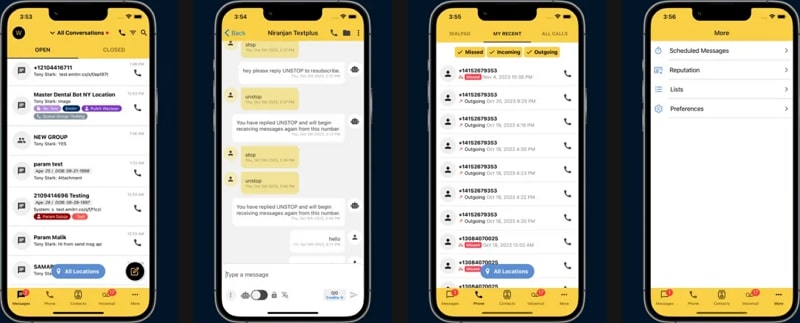
It’s a 24/7 automated answering and messaging platform built to help small businesses capture more leads. It handles incoming calls and texts, ensuring organizations don’t miss any opportunities outside working hours. The app lets teams do more as a team by centralizing communication on one platform instead of scattered calls/texts. Furthermore, this Textline competitor encrypts data in transit to protect information between apps and servers.
Key Features
- Includes the VoIP (internet calling) feature to make voice calls smoother.
- Helps turn more inquiries into paying customers by responding more consistently.
- Supports ongoing text conversations to confirm appointments and follow-ups with clients.
2. Heymarket (Android | iOS)
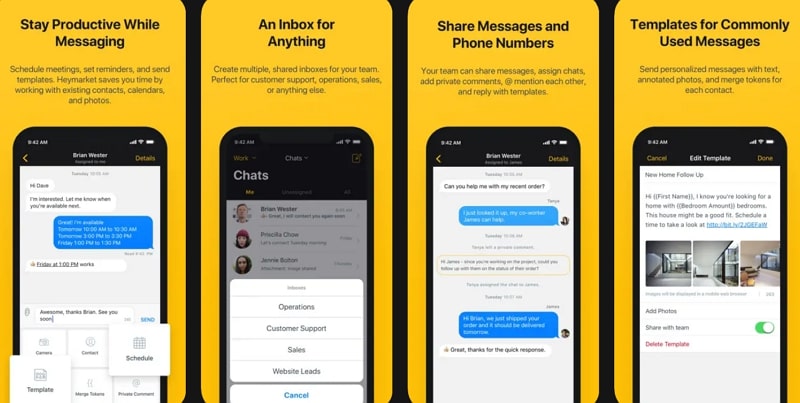
Another business texting platform that supports omnichannel messaging via emails, Facebook, and Apple Messages. With similar Textline pricing, businesses can allow team collaboration with shared visibility into conversations. You can even text multiple contacts in a single discussion to keep groups on the same thread. Moreover, sends automated text messages based on keywords, time, or sentiments, and enrolls contacts into campaigns.
Key Features
- Provides AI-assisted texting tools that can correct, shorten, or expand text.
- Offers campaigns and drip texting to send scheduled messages to groups.
- Roles and permissions for admins to examine what each user can do within the system.
3. TextMagic (Android | iOS)
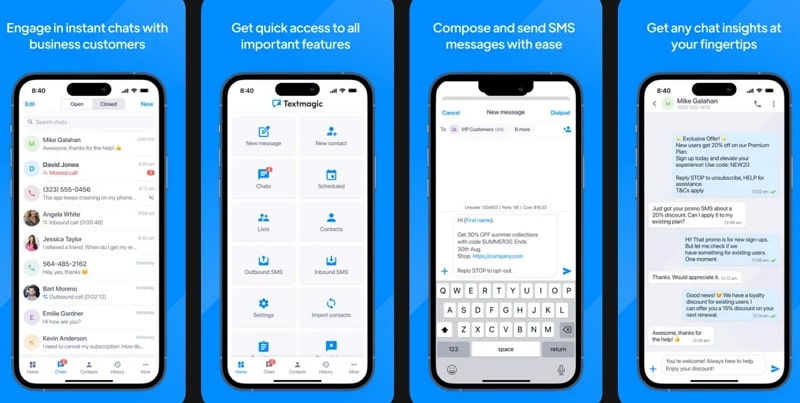
This Textline substitute is restricted to business users; personal messages are not allowed, keeping usage strictly professional. You can have regular back-and-forth SMS chats with individual customers from your business accounts. In addition, get alerts on your phone when new messages arrive, facilitating quick responses every time. Organizations can monitor delivery status and view past message history directly from the app.
Key Features
- Creates and manages contact lists while organizing customers into groups.
- It saves and reuses message templates to keep customer messages consistent.
- Import contacts from your mobile to start texting via the business system.
4. Klara – Patient Communication (Android | iOS)
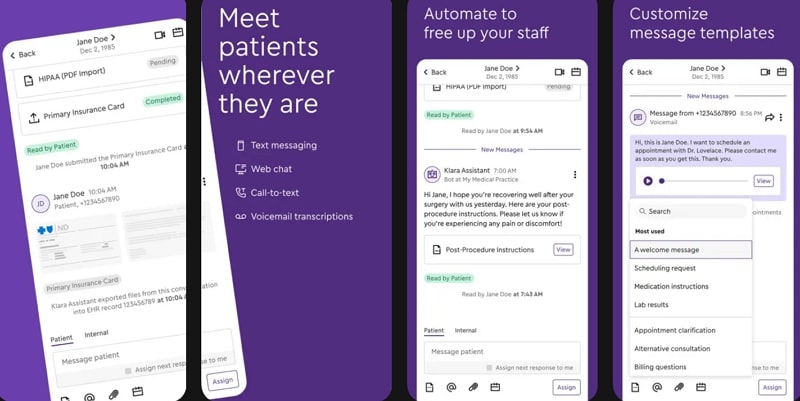
Klara is an alternative Textline app, but it’s primarily a telemedicine app that enables healthcare teams and patients to communicate. It’s made for clinics and hospitals to manage patient conversations, forms, and follow-ups more effectively. You can arrange video visits to see patients remotely during virtual appointments, instead of in-person visits. Additionally, it offers secure messaging with patients, allowing providers to chat and share updates.
Key Features
- HIPAA-compliant sharing of messages, documents, and photos to protect patient information.
- Sends digital forms to patients for completion online before and after visits.
- Delivers automated reminders and messages for appointments or post-visit follow-ups.
5. Chiirp (Android | iOS)
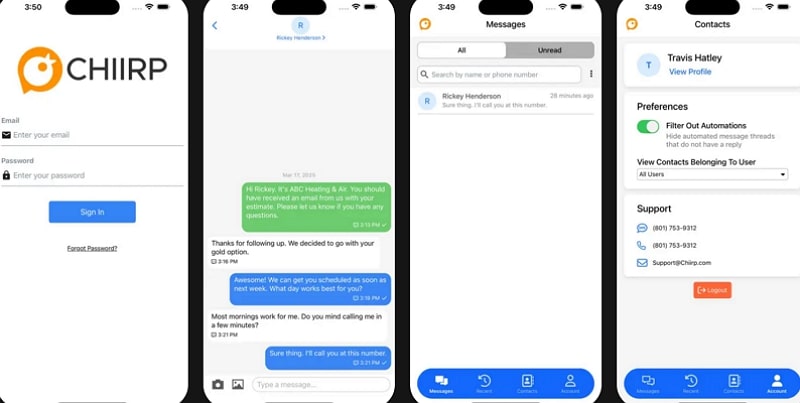
A Textline competitor that offers two-way texting to chat back and forth with leads and customers. Notably, it focuses on automated follow-ups, broadcast, and multi-channel messaging, allowing teams to work faster. Allows mass texting, sending a single message to multiple contacts at once for promotions or reminders. Furthermore, it offers drip campaigns that send a series of scheduled messages over days or weeks to nurture leads.
Key Features
- Provides a central shared inbox where teams can track status or respond.
- Offer lead capture tools like Text Us/ chat widget, turning web visitors into leads.
- Integrates with other business tools, so activities sync with existing workflows.
Benefits of Investing in Chat App Development Like Textline
For businesses looking to improve their customer engagement, review the provided benefits of investing in an app like Textline:
- Faster Customer Responses: Text messages are usually read within minutes, so customers receive an answer much quicker than by email. In addition, quicker responses improve customer satisfaction and make your support feel more valuable.
- Higher Engagement and Reply Rates: SMS has a very high response rate, enabling more customers to see and answer your messages. This leads to more confirmed appointments, feedback, and drives more sales opportunities from the same number of contacts.
- Lower Support and Communication Costs: A question handled by text is usually cheaper and faster than a phone call for both businesses and customers. Plus, an agent can manage several text chats at the same time instead of only one phone call.
- More Improved Team Collaboration: Shared SMS inbox allows the whole team to see and handle messages in one place, so nothing is missed. Moreover, features like assignments and internal notes prevent duplicate replies and make it clear who owns each conversation.
- Better Tracking and Insights: The central system maintains a complete history of conversations, making it easier to streamline each customer’s journey. Reports on volume, response times, and campaign results help you see what is working or what to improve.
How to Develop a Messaging App Like Textline
A precise development plan for a Textline alternative requires detailed planning, a clear feature set, and technical expertise. Considering this, the following section emphasizes guidelines that give your app a unique edge during the developmental phase:
1. Specify Goal and Core Features
First, clarify your target users and the main problem you will solve, such as slow responses or missed leads. From this, lock in a first feature set: two-way messaging, shared inbox, and contact management. Besides, write a clear must-have features document and stick to it to keep your development process more focused.
2. Plan a Detailed System Architecture
Design a modular architecture with separate services for authentication, management, and reporting so each piece can scale independently. Moreover, make use of message queues or event streams to decouple inbound/outbound messaging from the user interface. Plan for real-time updates, high availability, and horizontal scaling, allowing the system to grow from a few teams to thousands.
3. Add Automation and Productivity-Focused Tools
Start with core productivity: templates, scheduled messages, and simple keyword or time-based auto-responses. Later, build visual automation flows for reminders, drip campaigns, and lead sequences that mix SMS and other channels. Afterward, incorporate a visual automation builder that lets users drag and drop steps without requiring developers’ assistance.
4. Incorporate One-on-One Chatting with ZEGOCLOUD
Use ZEGOCLOUD In-App Chat SDKs to create a one-on-one chat space for a specific customer privately. You can even create unlimited open channels and send messages to connect hundreds of users. Additionally, add a group chat button directly within the chat to enable real-time conversations with multiple clients. Its pre-installed UIKits provide ready-made screens for call invitations, screen sharing, and virtual backgrounds.
5. Design and Build Client Apps
For web apps like Textline, follow a familiar shared-inbox pattern: left panel for inbox and filters, center for conversations. Include UX details such as keyboard shortcuts, quick actions, and inline tagging to reduce friction for heavy users. However, for mobile, prioritize a fast chat screen, reliable push notifications, and simple status changes (away/available).
6. Test Thoroughly and Monitor
Finally, set up automated tests (unit and end-to-end) and run a load test that simulates spikes in messages. Additionally, adding observability and alerts enables engineers to quickly detect and resolve issues in production. Most importantly, collect structured feedback from early customers and watch how they actually see the app.
Tech Stack for a Textline Clone App
A Textline-style app uses a modern web stack with a scalable backend, real-time messaging, and telecom integrations. Therefore, to generate a Textline competitor, analyze the provided breakdown of the considerations that deliver a professional user experience:
| Area | Recommended Technologies |
|---|---|
| Frontend (Web) | React or Vue.js, TypeScript, or HTML5, CSS3. |
| Frontend (Mobile) | React Native or Flutter (cross-platform)/ Swift (iOS)/ Kotlin (Android). |
| Backend- Core API | Node.js, Java, or Python |
| Real-Time Messaging | WebSockets or SDKs (such as ZEGOCLOUD or MQTT). |
| SMS/Telecom Provider | SMS APIs |
| Message Queue/ Events | RabbitMQ, Kafka, or AWS SQS |
| Auth and Security | JWT or OAuth 2.0, or HTTPS/TLS |
| Database Messages | NoSQL store like MongoDB or Cassandra |
| Testing & QA | Jest/Mocha (backend), Cypress/Playwright (front-end). |
How Much Does It Cost to Create an App Like Textline?
Planning a Textline app clone requires clarity around features, development effort, and long-term scalability. Hence, preferring the listed aspects early helps avoid unexpected expenses and ensures smarter investment decisions:
| Version | Approximate Cost (USD) |
|---|---|
| Basic MVP (Web Only) | $20,000 – $70,000 |
| Standard SaaS (Web + One Mobile App) | $80,000 – $15,000 |
| Complete Multi-Platform (Web + iOS + Android) | $120,000 – $200,000 |
| Enterprise-Grade (High Scale and Compliance) | $150,000 – $300,000 |
| UI/UX Design & Product Discovery | $5,000 – $30,000 (one time) |
| Infrastructure & SMS Usage (Live) | Highly depends on usage |
| On-Going Development & Maintenance | $4,000 – $15,000+/month |
Conclusion
In conclusion, planning and executing an app like Textline is a strategic move toward personalized communication. A professionally developed Textline clone can empower teams to manage conversations, improve response times, and even strengthen customer bonding. For a simplified development process, incorporating ZEGOCLOUD SDKs lets users jump from SMS to face-to-face support when needed.
FAQ
Q1: How do I create my own messaging app?
To create your own messaging app, you need to define the core features first, such as user authentication, one-to-one or group messaging, and notifications. From there, you can choose a tech stack for the frontend and backend, then integrate real-time messaging and media capabilities using APIs or SDKs instead of building everything from scratch.
Q2: How much does it cost to build a messaging app?
The cost depends on the app’s complexity, platforms, and features. A basic messaging app can cost relatively little to launch, while advanced features like voice calls, video chat, and scalability can increase development and infrastructure costs. Using ready-made messaging and real-time communication services can help control the budget.
Q3: How to make an app like Threads?
To build an app like Threads, you need more than basic chat. This includes social feeds, threaded conversations, user profiles, and content moderation. Many teams start with a core messaging system and gradually add social and community features as the product evolves.
Q4: Is it hard to build a chat app?
Building a simple chat app is not difficult, but creating a reliable and scalable one is more challenging. Handling real-time delivery, message sync, performance, and security takes effort. Using established messaging or real-time communication platforms can significantly reduce development complexity.
Let’s Build APP Together
Start building with real-time video, voice & chat SDK for apps today!
