










Customers today no longer wait; they expect conversations to happen instantly, especially on the platform they trust. Social messaging addresses this demand by creating direct, conversational channels between brands and their audiences. Moreover, it enables businesses to manage high volumes of inquiries, automate routine responses, and still deliver personalized experiences. To ensure that every interaction adds value to your customer’s experience, keep reading the guide for more knowledge.
What is Social Messaging?
Social media messaging is how people communicate online using messaging features built into websites, apps, and social platforms, rather than just through traditional SMS or email. Additionally, it means real-time or near-real-time chat where users can send text, images, and other interactive content inside the app. Similarly, people using a social network app or game don’t have to switch to another tool to communicate.
From a product point of view, social messaging is about adding rich in-app chat experiences, like direct messages and threaded replies. Other features, such as message reactions and notifications, further help users connect, collaborate, and build communities around the main service. Moreover, in apps today, this kind of messaging is a fundamental part of the user experience, keeping people engaged.
Why is Social Messaging Important for Business?
The requirement for continuous and accessible communication redefines how brands interact with their audiences. For more clarity, review this section to know why social media chat is essential for business now:
- Improves User Experience and Retention: When people can chat directly within the app, they stay longer and interact more with your product. Steam reports that rich in-app messaging and social chat can drive 40% more user engagement and 50% more user retention.
- Builds Stronger Communities and Customer Relationships: Social messaging lets users connect in real time, fostering a sense of community around your brand. Moreover, features such as group chat, reactions, and presence make conversations feel natural, improving customers’ trust.
- Better Conversations, Support, and Overall Experience: In-app messaging makes it easy to answer questions, handle support, and guide users while they are already using your product. As messages are real-time and often personalized, businesses can resolve issues faster and keep conversations in one place.
- Enables Personalized, Timely Communication: This kind of messaging lets businesses send targeted, real-time messages based on user behavior, such as reminders. Furthermore, these timely messages are less like spam than bulk email and are more likely to be read.
- Scales Across Many Use Cases and Industries: These messages work for many business types, such as communities, marketplaces, e-commerce, and more. With APIs or SDKs, companies can reuse the same messaging backbone for support chat, group communities, and collaboration.
How Does Social Messaging Work?
These social messages operate through a seamless exchange of information, where every interaction is captured or routed. However, a complete workflow is involved for how each message is managed, delivered, and responded to:
1. Users Chat Inside the App
Social messaging lets people communicate directly within an app rather than switching to WhatsApp or email. Additionally, users can send text messages, emojis, images, or short videos, and they see replies appear in the same interface. Common examples include social feeds, marketplace listings, or community spaces, where conversation feels natural and doesn’t interrupt main tasks.
2. Messages Go Through a Chat Server
When someone presses “send,” the message is sent to a chat server (the backend) that handles all the logic. Plus, that server saves the message, determines which user should receive it, and then pushes it to all devices. Moreover, messages are sent in a correct order, so everyone in the conversation sees the same history and stays in sync.
3. Apps Use Chat APIs and SDKs
Most companies don’t build their own messaging engine from scratch because real‑time chat is complex and time-consuming. Instead, they plug in chat APIs and SDKs that provide ready-made building blocks for channels, messaging lists, and typing indicators. Thus, developers can quickly add social messaging to web or mobile apps with only a few lines of code.
4. Real-Time Updates with WebSockets or Other Tech
To make chat feel instant, the app keeps a live connection open to the chat server, often using WebSockets. Due to this constant connection, new messages, edits, and changes to presence can appear on screen as they happen. A recent UNRD.ORG report explains that WebSockets-based systems can keep average round-trip latency around 30-40 milliseconds.
5. Security, Moderation, and Controls
Behind the scenes, the messaging backend also manages security and moderation rules to keep chats safe and under control. Additionally, it can handle user authentication, permissions, and filters for spam or abusive content. Plus, tools for admins to mute, block, or remove messages are important for public communities and business apps.
Common Features of Social Messaging
With media chat being common and evolving these days, its features also mark an important role in shaping effective communication. Therefore, we will explore some features below that make interactions richer and better aligned with user expectations:
- One‑to‑One and Group Chats: Social messaging often includes direct messages between 2 people and group chats with multiple people in the same channel.
- Real-Time Text Messaging: Messages are delivered in real time, so users see new messages appear instantly as others type and send.
- Reactions and Emojis: Users can react to messages with emojis, instead of always typing a full reply during a conversation.
- Read Receipts and Typing Indicators: The read receipts show when others have seen your message, and typing indicators show when someone is currently typing.
- User Presence (Online/ Offline Status): The Presence feature shows whether a user is online, offline, or recently active, helping people decide when to send a message.
- Attachments: Images, Files, Links, GIFs: It lets users share more than plain text, such as images, files, or video clips, with built-in support for GIFs.
- Threads, Replies, and Mentions: These features allow people to respond to a specific message, keeping related comments grouped together.
- Notifications and Unread Counts: Push notifications and unread message counts bring users back when there is new activity in the app.
- Moderation and Safety Tools: Many social messaging platforms include moderation features such as message flagging, blocking, muting, and AI-based content filters.
Benefits of Social Messaging
As customer expectations turn towards more convenient interactions, businesses need communication methods that keep pace. Thus, this section highlights the benefits that social media chats bring in delivering faster and more impactful interactions:
- Higher Engagement and Retention: Social messaging keeps people active inside your app because they can talk, share, and react in real-time. It directly supports growth by turning one-time visitors into returning, loyal users who keep your product open and in use.
- Stronger Community and Brand Connection: When users can message each other and your team directly, they start to feel part of your community. Moreover, it helps people build relationships, ask quick questions, and get support, improving trust in your brand.
- Better Customer Experience and Conversions: With social messaging, it’s easier to answer questions and solve problems while customers are still on your side. Just because responses are fast and happen in context, users are more likely to complete actions, increasing expectations.
- Lower Support Costs and Faster Help: In-app chat lets support teams handle many conversations at once rather than one-by-one phone calls or long email threads. This reduces support costs and speeds up response times, as agents can send quick replies and keep a message history.
- More Personal and Contextual Communication: As social messaging happens inside the product, messages can be tied to what the user is doing right now. That context allows businesses to send more personal, relevant messages and guidance, improving the user expectations.
Use Cases of Social Messaging
In current times, customer engagement relies on flexible and always-available communication channels. Against this backdrop, social media messaging enables real-time, context-aware interactions that support a wide range of needs:
| Use Case | How Social Messaging Is Used |
|---|---|
| In-App Communities | Enables members to chat in real-time, share updates, and build relationships. |
| Marketplaces (Buyer-Seller) | Let buyers ask questions, negotiate, and coordinate with sellers. |
| Customer Support & Success | Provides live, in-app chats to offer users help and onboarding guidance. |
| Team & Project Collaboration | Gives teams channels and DMs to coordinate work or share files. |
| Gaming and Social Apps | Power party chats and friend messaging to coordinate players. |
| Live Events & Streams | Adds chat alongside live video, allowing viewers to ask questions and interact. |
Top 5 Social Messaging Apps You Should Know
In this digital space, a social message is the core element driving interactions across the top messaging apps. To elaborate more, we’ve hand-picked the top 5 social messaging apps that you should be aware of:
1. Snapchat (Android/iPhone)
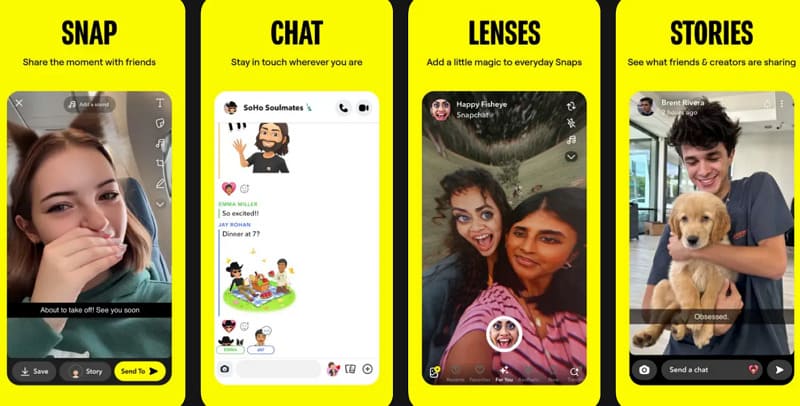
Snapchat’s primary feature is sending quick photo and video messages called “Snap” to friends or groups. However, you can add text stickers, filters, and lenses, then send the Snap, which usually disappears after it’s viewed. Plus, it has a normal chat section where you can send text messages, emojis, voice notes, and videos.
2. Instagram (Android/iPhone)
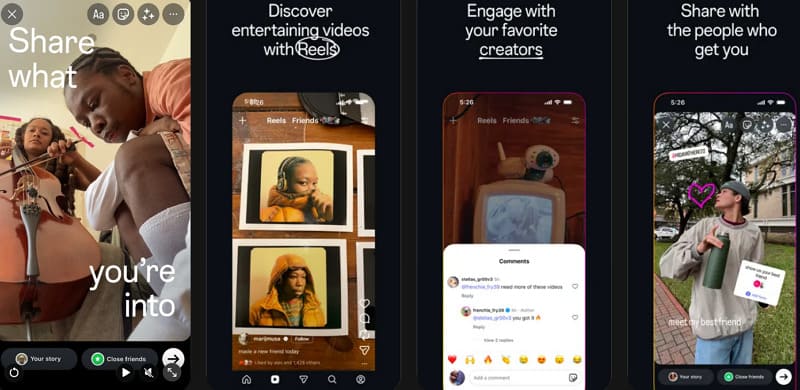
This social messaging app lets users direct send private messages to one person or to group chats with multiple people. In DMs, you can share posts, stories, reels, profiles, voice, and video calls in the same chat thread. Additionally, its Vanish Mode lets you send messages that disappear after they’re seen and when both users leave the chat.
3. Discord (Android/iPhone)
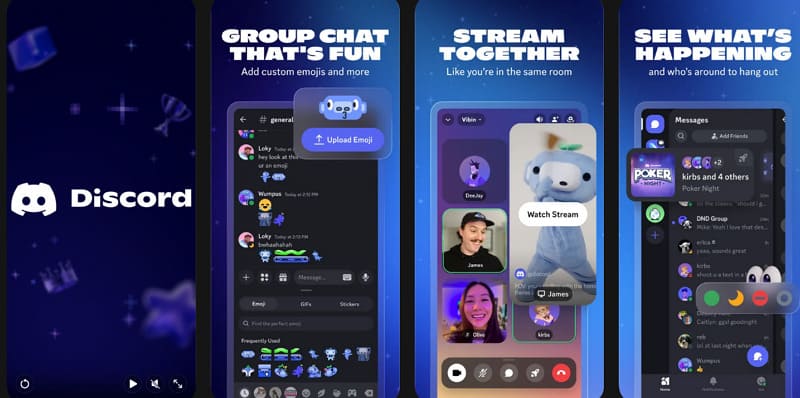
On Discord, every server has a text channel where people can send messages, emojis, images, and links about specific topics. With this media chat app, you can create group DMs with several friends and share files without needing another server. Moreover, users can easily hop in and out of voice or text chats without calling or inviting anyone.
4. Facebook Messenger (Android/iPhone)
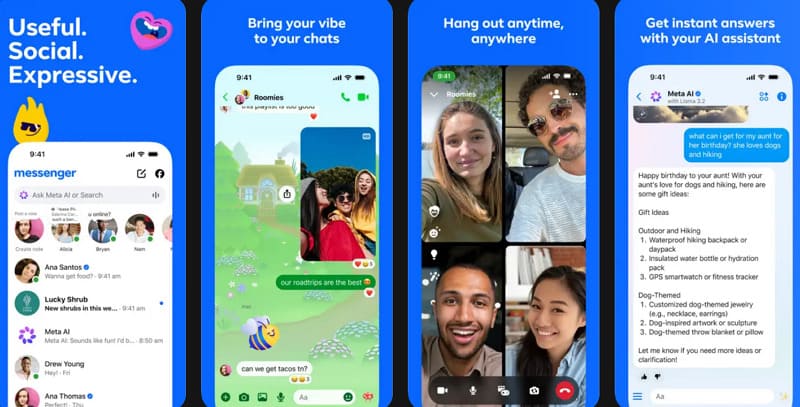
Messenger supports free voice and video calls, enabling you to talk face-to-face or have audio calls over the internet. Furthermore, it now has end-to-end encryption by default for personal chats, which means only you and the other person can read conversations. The social messaging app allows disappearing messages, message editing, media galleries, and AI-assisted features to make chat more flexible.
5. WeChat (Android/iPhone)
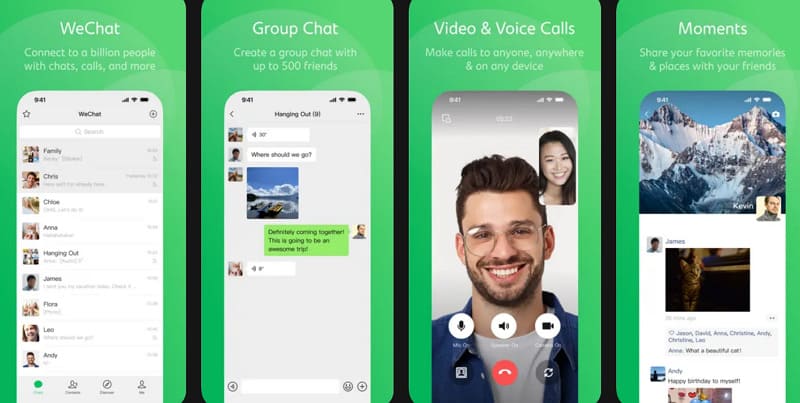
Another media chat app that facilitates up to 500 members for group chats, useful for families and community groups. WeChat supports quoted replies, including visual replies with images and videos, to respond to specific messages within the app. Besides this, you can share your GPS location, contact cards, “red packet” money gifts, and many other mini-features.
How to Build Social Messaging Apps with ZEGOCLOUD
You build a social messaging app with ZEGOCLOUD by plugging its over 20 ready-made SDKs and APIs into your app. In practice, create a project in the ZEGOCLOUD console, enable the In-App Chat service, enter your credentials, and integrate the SDKs. Its instant messaging SDK supports one-to-one and group chats, in-room chat with read receipts, typing indicators, and push notifications. Moreover, it supports many message types, including images and files.
Importantly, its In-App Chat is designed for high concurrency and ultra-low latency, with real-time coverage of 200+ countries. However, the platform has a typical message delivery time of about 200 ms. This is an important factor in social messaging because it keeps conversations instant, when many users are online. For safety, you can integrate its built-in content moderation, which automatically checks text and voice messages for inappropriate content.
Conclusion
In conclusion, social messaging in current times helps people and businesses to communicate with ease, directly and flexibly. Besides this, social chats will remain a key driver of customer satisfaction and long-term relationship building for many years. Therefore, those who deliberately want to scale a powerful social messaging platform are suggested to integrate ZEGOCLOUD’s boundless UIKits.
FAQ
Q1: What Is Social Messaging?
Social messaging refers to digital communication that combines real time messaging with social interaction features. Unlike traditional SMS, social messaging platforms support group chats, media sharing, voice and video calls, reactions, online communities, and interactive user experiences. Popular social messaging apps are commonly used for personal communication, customer engagement, gaming communities, and creator platforms.
Q2: What Is an Example of Social Messaging?
Popular examples of social messaging platforms include WhatsApp, Telegram, Discord, Messenger, and WeChat. These apps allow users to exchange messages, share media, join communities, and interact through voice or video communication in real time.
Q3: What Is the 5-5-5 Rule for Social Media?
The 5-5-5 rule is a content engagement strategy often used in social media marketing and community growth. It typically refers to spending time engaging with other users before heavily promoting your own content. A common interpretation includes:
- Engaging with 5 posts from others
- Leaving 5 meaningful comments
- Building relationships with 5 new users or communities
Q4: What Is Replacing Facebook?
While Facebook remains one of the largest social platforms globally, user behavior has gradually shifted toward more community-driven and messaging-focused platforms. Apps like Discord, Telegram, TikTok, and private group-based communities are becoming increasingly popular, especially among younger users. Many platforms now focus more on real-time interaction, creator communities, and private social communication rather than traditional public social feeds.
Let’s Build APP Together
Start building with real-time video, voice & chat SDK for apps today!
