










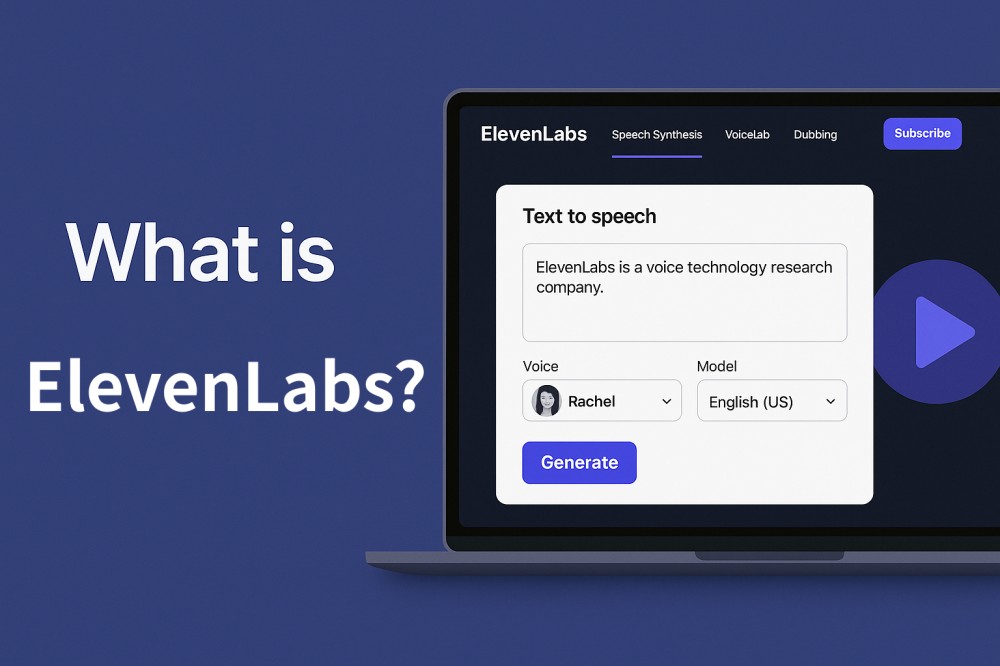
Many creators struggle to make audio content sound natural and professional without expensive equipment. Hence, ElevenLabs solves this issue and turns text into realistic and human-like speech in no time. It’s a handy tool for educators, businesses, and podcasters to create life-like voices for various use cases. Thus, this article will review this solution in detail to understand its capabilities, limitations, and whether teams may seek more customizable or real-time interaction solutions.
What is ElevenLabs (Elevenlabs.io)?
ElevenLabs is an AI audio company that helps people create and use human-like speech. Additionally, it is known for realistic text-to-speech, voice cloning, and real-time voice agents. The platform can turn text into natural speech in many languages, where one can control tone and emotions. Besides, it offers tools for developers and creators/businesses to add voice features to apps, games, or audiobooks.
Furthermore, ElevenLabs AI focuses on audio quality, scalability, and security for commercial use. Users can also access support for APIs and SDKs, so products can embed these models for things like voiceovers or audiobooks.
Key Features of ElevenLabs
ElevenLabs text-to-speech and voice clones are a few aspects that appeal to the developers and creators. However, little do they know that the platform offers unlimited features with countless perks. Thus, this section will uncover a few of them below for you for better clarity and hyper determination:
1. Text to Speech
With the support of over 70+ languages and assistants, users can create AI voices after choosing models like Multilingual v2, Eleven v3, and Flash. Additionally, the tool allows users to adjust the speed of outcomes, which they can also preview. The best aspect is that the AI responds to the emotional cues in the text to produce accurate voices.
2. Voice Cloning & Voice Design
You can also design voices where the feature is powered by the Text-to-Speech v3 model. One can choose from settings like Age, Gender, Tone, Pace, etc, with the facility to preview results later. Additionally, developers can integrate the voice design into products with an API and create a voiceover from a text prompt.
With support for multiple file types like EPUB, PDF, TXT, HTML, etc, ElevenLabs AI voice clone feature is exceptional. Additionally, the tool offers support for 70 languages to clone voices for audiobooks and other use cases.
3. Real-time STT & Speech to Text
Scribe v2 Real-time offers you instant transcriptions for meetings and conversational AI. Additionally, the tool provides stream audio and receives transcriptions in ~150ms for real-time understanding of live agents and conversational AI. Moreover, it has support for 90+ languages with diverse accents, dialects, and acoustic conditions.
The tool also ensures data privacy, since it supports SOC 2, HIPAA, and GDPR compliance. Furthermore, Scribe v2 and v1 are integrable with products via the API, with complete streaming support.
4. Voice Isolator, Sound Effects, & Music
While using the ElevenLabs API, use its Voice Isolator, where AI automatically detects the noise to produce clear and crisp outcomes. Additionally, users can easily use the tool in browsers and add likes in any format, such as MP3, WAV, MP4, and MOV.
With the API access and SB1 Infinite Soundboard, create any sound with the ElevenLabs Sound Effect tool. Moreover, the looping SFX plays the generated sound in a loop so that the ending blends seamlessly into the beginning.
On the contrary, the Music tool creates songs for you just by describing genre, mood, instrument, and theme in natural language. Hence, with multilingual support and narrative tone sync functionality, you get natural and studio-grade audio in no time. Thus, all these facilities make ElevenLabs an ideal option for video creators, podcasters, and audiobook authors.
The Pros and Cons of ElevenLabs
To decide if you need an ElevenLabs alternative, the best option is to review its pros and cons, since they take the hassle of reading extensive details. Therefore, this section highlights the perks and pitfalls of this versatile option in detail:
Pros
- Voices sound natural and expressive with clear emotion and strong control of tone.
- Creates custom voices that match real speakers closely for brands and characters.
- Offers TTS, STT, translation, voice change, and real-time agents in one platform.
- APIs and tools help developers add voice features to products with ease.
- Handles large projects with batch tools, team features, and stable performance.
Cons
- Costs rise fast for long audio, so small teams face higher bills.
- Advanced features need skill, so new users face a clear learning curve.
- Some users report slow support and peak time issues that disrupt work.
- Voice quality varies by language, so some accents show clear inconsistencies.
- Needs stable internet and careful voice rights handling due to cloud limitations.
As more developers explore voice-driven products and conversational experiences inspired by ElevenLabs, some teams are also considering building their own real-time voice agents or multimodal AI systems. In such cases, ZEGOCLOUD provides the underlying RTC and AI Agent capabilities to support these scenarios.
How Does ElevenLabs Work?
No matter if one decides to try ElevenLabs AI voice generator, using this tool is seamless since it works on innovative models. Here, take TTS as an example that leverages Multilingual v2, v3, and Flash models to produce life-like speech in no time. So, to know how it actually functions using the Playground feature, adhere to the listed guidelines in detail:
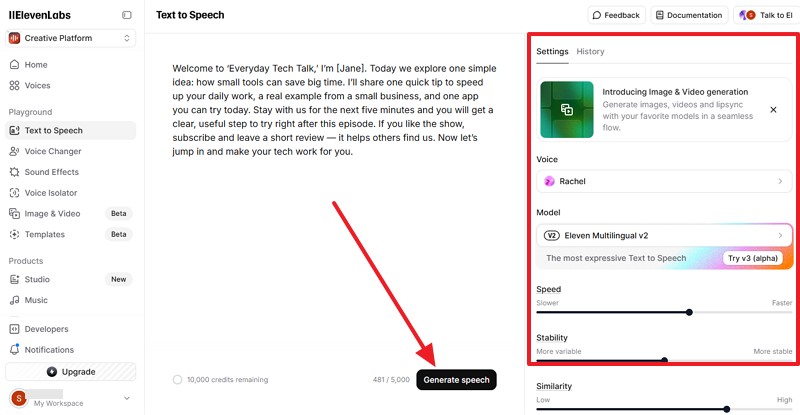
Step 1. On the tool, enter the text that you seek to convert to speech and head to the right side menu. There, adjust the Speed, Stability, and Similarity along with other settings. Also, choose the voice by expanding the “Voice” menu and decide to toggle the “Speaker Boost” option. Now that all the settings are determined, press the “Generate Speech” button to let the AI process the data.
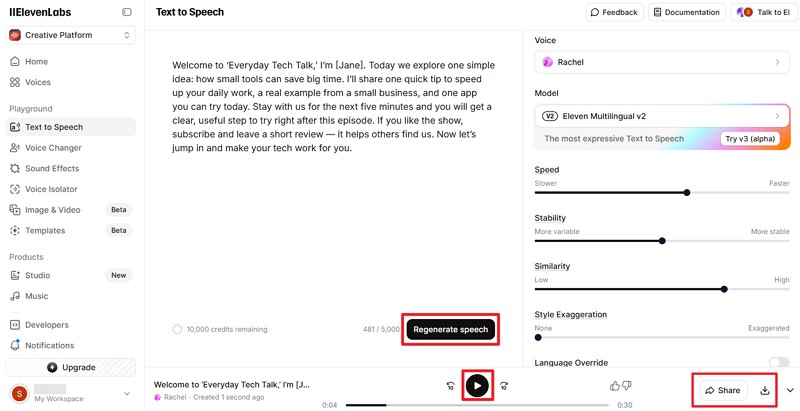
Step 2. Wait for a while and press the “Play” button at the bottom to preview the generated speech. If everything seems right, pick the “Share” option or the “Download” icon to use it later. Plus, you can also choose to “Regenerate Speech” for situations where you don’t like the generated voice.
ElevenLabs Pricing
When one decides to use ElevenLabs for voice generation or cloning, ElevenLabs’ pricing is a primary factor that raises concerns. Thus, this section will break down the cost for you so that you can determine if it suits your budget:
| Plans | Monthly | Yearly |
|---|---|---|
| Free | $0 per month | $0 per month, Billed yearly |
| Starter | $1 per month | $4.17 per month, Billed yearly |
| Creator | $11 per month | $18.33 per month, Billed yearly |
| Pro | $99 per month | $82.5 per month, Billed yearly |
| Scale | $330 per month | $275 per month, Billed yearly |
| Business | $1,320 per month | $1,100 per month, Billed yearly |
How to Build a Voice Chatbot using ElevenLabs
With a list of features available, you now use ElevenLabs to create AI chatbots or conversational AI to automate tasks. So, if you want to avail its perks too, here is a detailed guide on how to create an agent and design a workflow:
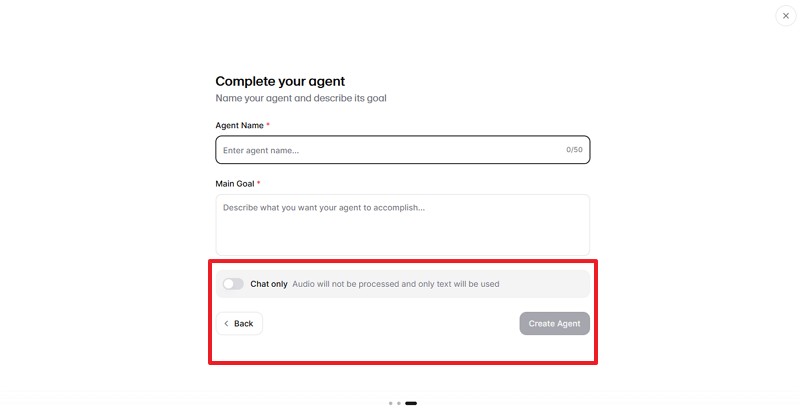
Step 1. Choose to Create an Agent and determine the name and goal of the Agent on the main interface. After that, decide to enable the “Chat Only” option and press the “Create Agent” button to commence.
Step 2. Now that you have created an agent, decide on the “System Prompt” and “First Message,” where you can also set the personality and time zone settings.
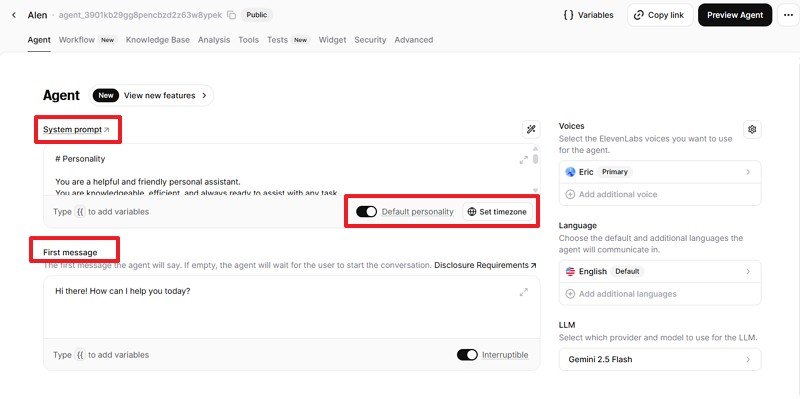
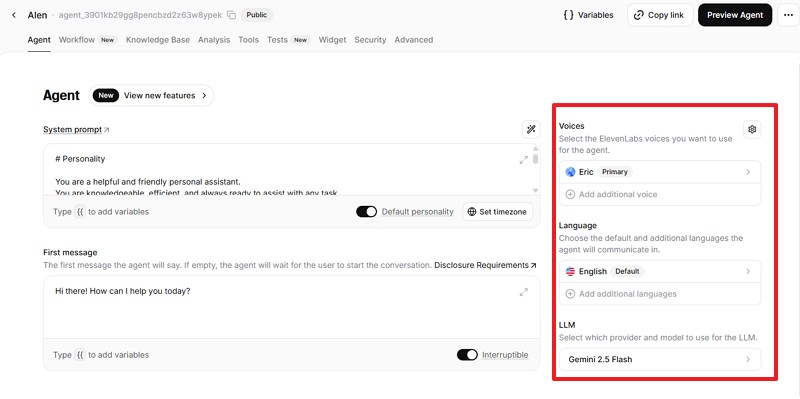
Additionally, choose the “Voice,” “Language,” and “Model” from the right side.
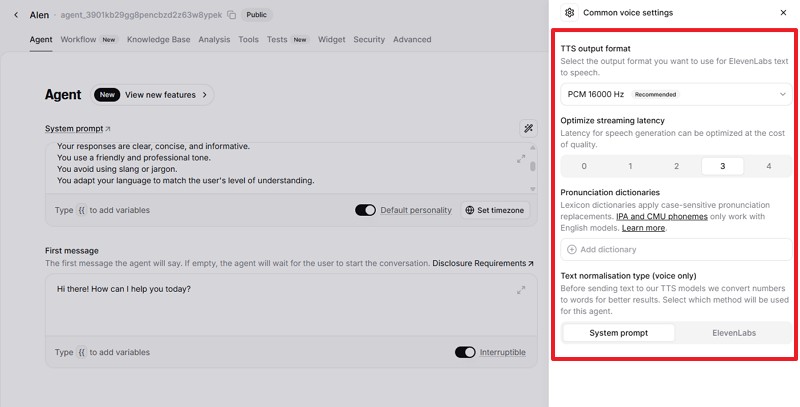
Step 3. Also, choose the “Settings” icon to further tailor the parameters like “TTS Output Format” or “Optimize Streaming Latency” within the “System Prompt” tab. For further controls, users can also access the “ElevenLabs” tab.
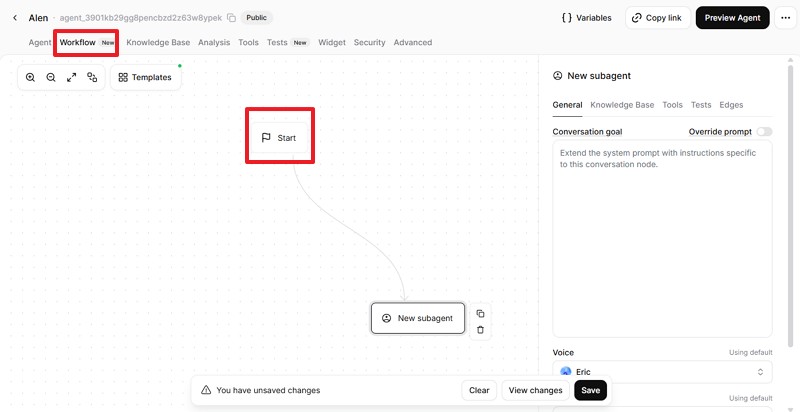
Step 4. For users who need better controls, head to the “Workflow” tab and define stages like greeting, question asking, tool calls, and closing messages. Start from the default flow “Start” and add nodes/blocks for things like greeting, collecting user info, calling APIs, etc.
Step 5. After adding all settings, locate the “Test” console to try conversations with your bot. If it gives wrong or stuck answers, adjust the System Prompt, workflow steps, or tool settings until it works better.
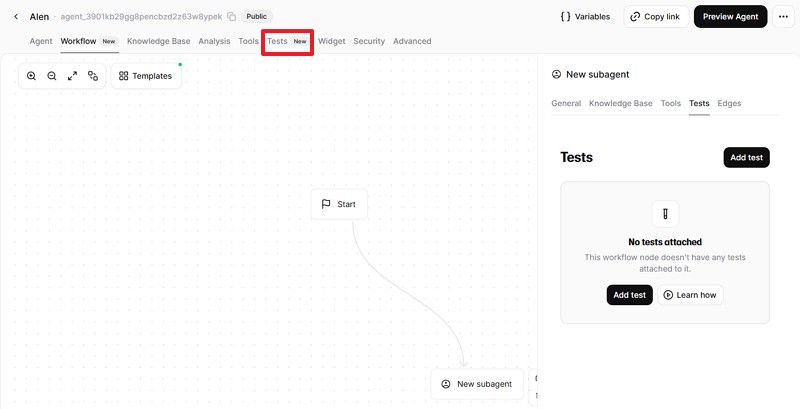
Step 6. Now, press the “Preview Agent” option displayed at the top right corner to test personally.
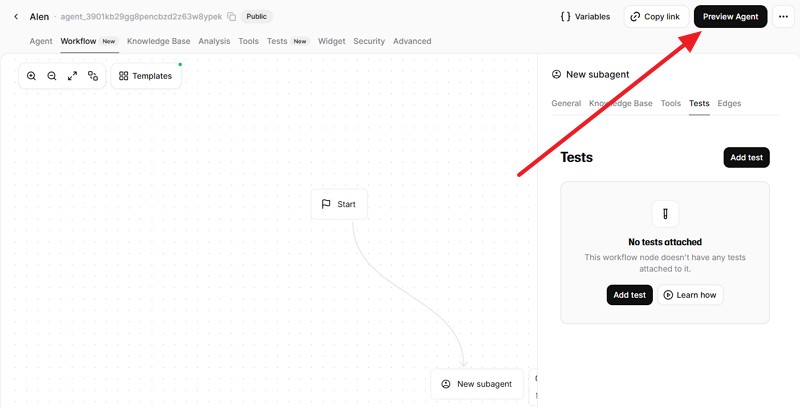
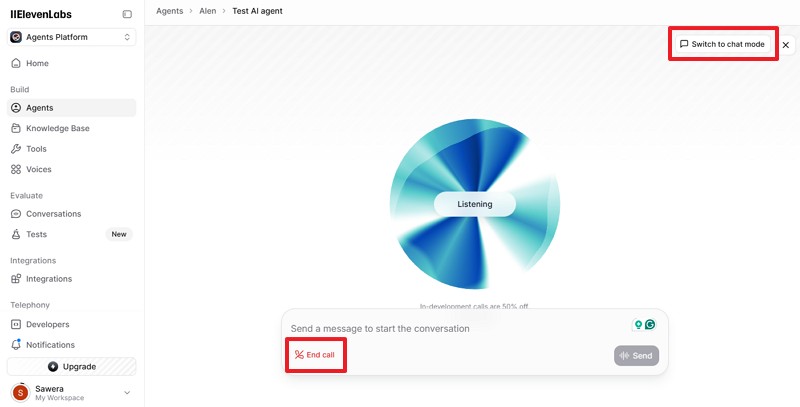
Here, choose the “End Call” button once you are sure that everything is working fine. Also, try the “Switch to Chat Mode” to see if it’s working fine.
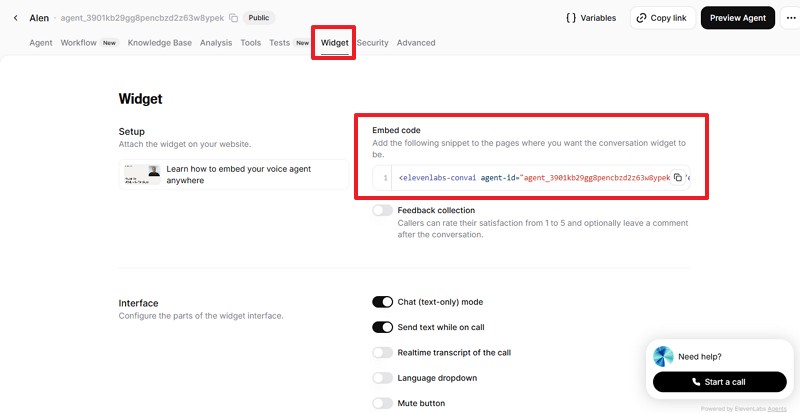
Step 7. Now, head to the “Widget” mode and choose “Avatar,” “Interface,” and “Setup” for the chatbot. Also, copy the “Embed Code” and embed a floating “Talk To Us” button that streams mic audio to the agent and plays responses back.
Conclusion
To conclude, ElevenLabs stands out for its speech generation capabilities and voice cloning technology, making it a strong choice for creating natural-sounding audio content. If your goal is to explore TTS, multilingual voice outputs or prototype voice-driven features, its toolset gives you everything you need.
If you are planning to build your own voice creation platform or develop an interactive experience inspired by ElevenLabs, ZEGOCLOUD can help you move forward. With real-time audio communication, instant voice interaction support, and a conversational AI Agent API, ZEGOCLOUD provides the technical foundation for developers who want to create similar or even more advanced solutions.
Let’s Build APP Together
Start building with real-time video, voice & chat SDK for apps today!
