










Developers looking to build voice-driven agents are increasingly exploring Vapi AI, a platform designed for creating phone-based and browser-based voice assistants. In this review, we will take a detailed look at how Vapi works, its pros and cons, pricing, and the technical components behind its voice agent capabilities. Since some teams may prefer building voice interaction systems directly inside their own products rather than configuring them through a hosted platform, this article will also briefly touch on the alternative approach of using foundational real-time communication and AI agent infrastructure to achieve similar results.
What is Vapi AI?
Vapi AI, also known as Vapi, is a platform that helps developers build voice AI assistants. Hence, these assistants can talk with people over the phone or via a browser. It combines speech recognition, smart AI models, and text-to-speech to make natural and fast voice conversations. Thus, one uses it mainly for support, sales, and other phone-based tasks.
Furthermore, Vapi provides users with tools such as an API and a dashboard to build, test, and run voicebots. The voicebots can answer calls, talk to users, and connect to other apps or databases when they speak. Regarding functions, it works by converting the speed to text using AI to generate responses, then turning the text back into speech.
Key Features of Vapi AI
When you have decided to use the Vapi API, do you know what features it offers and how you can use them? In this regard, review the listed details and understand how it creates natural conversations and automates tasks:
1. Real-Time Voice Conversations
The AI replies to users under sub-500ms latency, and the assistant starts speaking before the user finishes. Additionally, users can talk to the bot naturally, where built-in conversation guardrails stop the AI from making mistakes.
2. Full Voice Stack
Users can choose from services such as TTS, STT, or LLMs to balance cost and quality. Moreover, it supports many vendors, such as Deepgram and Azure for transcription, and OpenAI/Anthropic for LLMs, as well as Azure/ElevenLabs/Play.ht for voices in a single API. One can also receive help and a dedicated engineer to set up and go live within a week.
3. Phone & Web Calling
Vapi voice AI also includes phone numbers for incoming and outgoing calls and works with your existing services like Twilio. Users can also talk to the AI through a website or app with a click using web calling. Moreover, it enables you to create agents that can speak in 100+ other supported languages, which makes it flexible for engineers and businesses.
4. Flow Studio & Workflows
In addition, a visual builder lets you create call scripts without coding. With 1000s of configurations and integrations, you can design questions, decisions, API calls, and many more. Besides, developers can bring their own API keys for transcription, AI, or TTS, or connect to their own hosted models.
5. Tool & API Integration
You can connect your APIs so the AI can access data and perform tasks on your server. Additionally, Vapi lets you use different prompts, voices, and flows to improve performance over time with A/B experiments. Besides, the AI decides when to use tools, and Vapi manages the connections automatically.
6. Knowledge Base & RAG
This platform also lets you connect documents or help centers, so the AI answers company-specific questions. It also searches the knowledge first, then uses AI to phrase safe, accurate answers in your brand’s style.
7. Analytics, Transcripts, & Call Summaries
Vapi even offers the facility to record calls, where transcripts and summaries capture key points and next steps. Additionally, the dashboards show call metrics and customer satisfaction to help you improve scripts and processes.
The Pros and Cons of Vapi AI
Though you get a developer’s first experience with Vapi, know that the coin has two sides, and this solution is no exception. Therefore, review the given pros and cons to determine if there is any need to seek Vapi alternatives:
Pros
- Fast, natural voice with low delay and smooth human-like conversation.
- It combines telephony, speech-to-text, LLMs, and text-to-speech in one platform.
- Choose OpenAI, Anthropic, Deepgram, or ElevenLabs for cost and quality control.
- Visual builder allows anyone to create call logic and workflows easily.
- Built-in phone numbers and browser calls work across multiple channels.
- Ideal for support, sales, and booking, with transcripts, summaries, and CRM integration.
Cons
- Many options for providers, flows, and tools create a learning curve.
- Per-minute pricing and provider fees can increase at high call volumes.
- AI quality relies on both Vapi and chosen STT, LLM, and TTS vendors.
- Full use requires developer work and backend integration for best performance.
- Regulated or on-premise environments may need stricter rules than the cloud provides.
As more teams explore voice-driven applications and conversational AI built on platforms like Vapi, some developers may still prefer to design voice interaction systems entirely on their own or embed them directly into their existing products.
When that direction is needed, ZEGOCLOUD offers the core real-time communication layer and AI agent capabilities to support it. Developers can use ZEGOCLOUD to enable live voice, video, and chat communication, access ready-to-use UIKits, and build interaction flows with low-latency RTC performance. This approach allows full control over the logic, interface, and integration model when creating voice agents or multi-modal assistants.
How Does Vapi AI Work?
Vapi AI acts as a bridge between the caller and multiple AI services. Moreover, it listens to the caller, understands what is said using AI, decides how to respond, and replies with a natural synthetic voice in real time. So, if you are eager to know how it does all this and how you can use it, adhere to the given guidelines:
How One Call Works
- A user begins a call through a phone or browser to interact with the AI.
- Vapi converts the user’s spoken words into text using a speech-to-text processing engine.
- Afterward, the text is interpreted by an AI language model, which tracks context and generates responses.
- The AI’s reply is converted to natural voice using text-to-speech and sent back immediately.
Core Modules
- Transcriber (Listen): Converts speech to text in real time, letting AI start preparing a reply early.
- Model (Think): AI interprets user intent, calls tools or APIs if needed, and generates responses.
- Voice (Speak): Converts text responses into natural-sounding speech, controlling tone, style, and language.
How Developers Use Vapi AI
To begin with, the developers define the AI assistant through API, SDK, or dashboard. Moreover, they choose speech, AI, and voice providers and set prompts. They also connect tools and optionally add a knowledge base for smart answers.
The assistant is then connected to phones, campaigns, or web widgets so real users can talk to it. So, if you need a visual guide on how to perform all these steps easily, here is the detailed guide on the Vapi workflow:
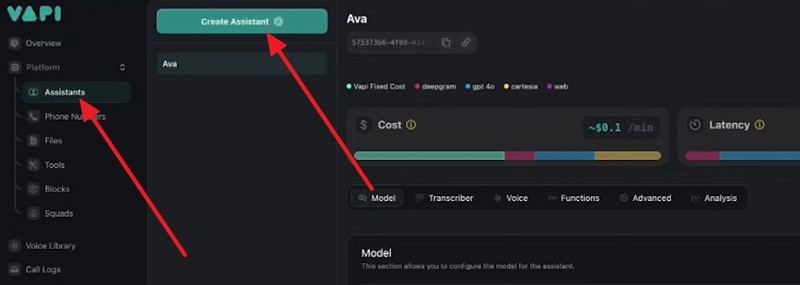
Step 1. As you go to the Vapi website and sign up, access the dashboard, and head to the “Assistants” tab to press on the “Create Assistant” option.
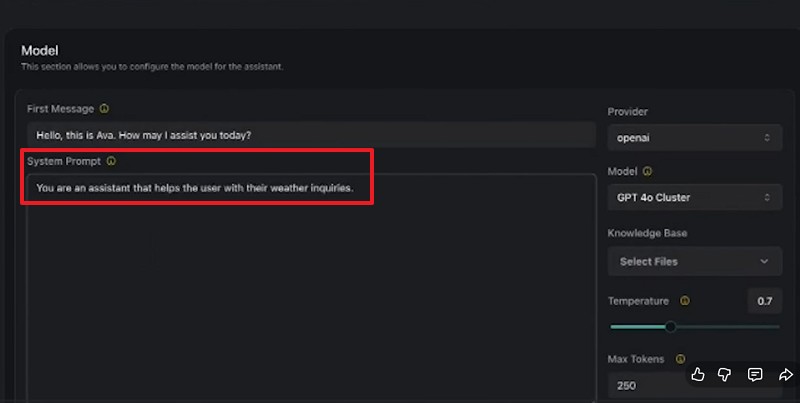
There, give the assistant a name and a short system prompt that explains its role in the “System Prompt” section.
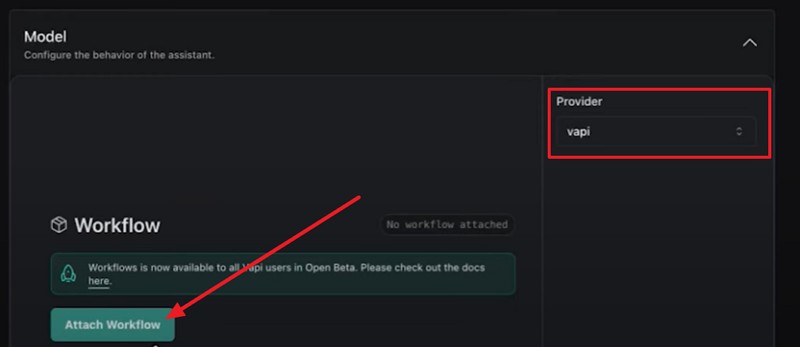
Step 2. Now, to create a workflow, choose “Vapi” under the “Provider” section and select the “Attach Workflow” button.
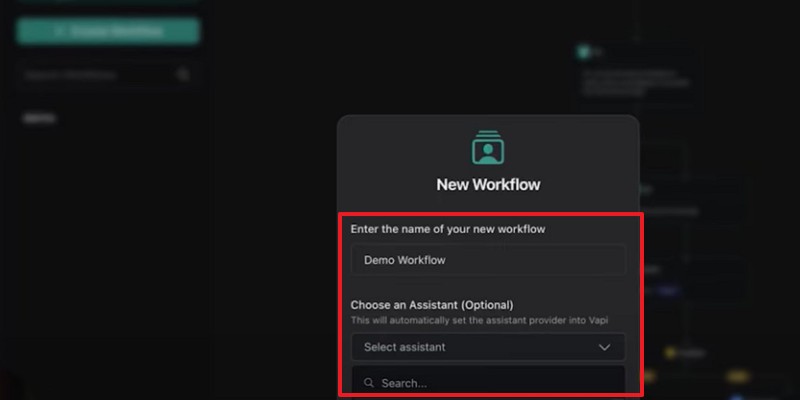
Step 3. Head to the “Workflow” tab as you publish it and enter the name and assistant as you press the “Create Workflow” option.
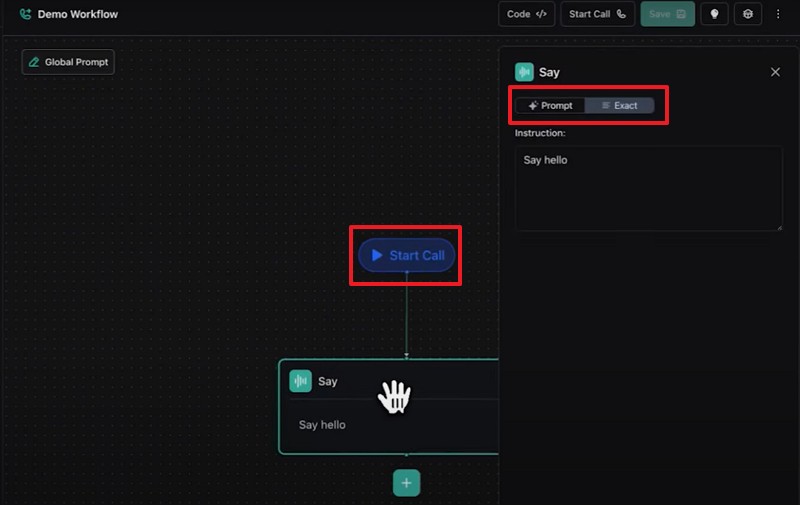
Step 4. This will guide you to a conversational workflow where you set guidelines for the AI to follow. There, you will find the “Start Call” trigger and the “First Action,” which you can keep as Exact or add a Prompt of your own.
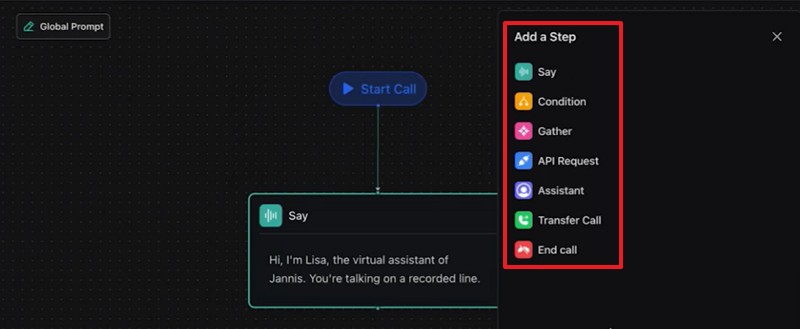
Step 5. Press the “Global Prompt” option, which will help you define your assistant’s persona and guidelines. There, you can also tap the “+” icon to add other actions like Say, Condition, etc.
- Say: Send a specific message or let the assistant speak based on a prompt.
- Condition: Branch the flow depending on user input, tool results, or metadata.
- Tools/API actions, transfer/handoff, and End Call, depending on your flow needs.
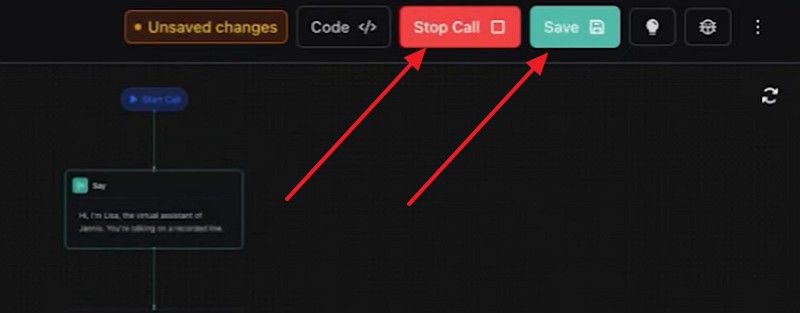
Step 6. After you have added the guidelines, select the “Save” button, then press the “Start Call” option to test it. Once done, hit the “End Call” option and save the created assistant via Vapi.
If your goal is to build voice driven interactions directly inside your own product instead of configuring agents on an external hosted platform, ZEGOCLOUD provides the real-time communication stack, SDKs, and AI Agent APIs needed to support that approach. This approach gives developers full control over latency, experience, and integration logic, using ZEGOCLOUD as the foundation on which their own voice, video or multimodal agents are built.
Popular Use Cases of Vapi AI
Beyond its core technical architecture, Vapi has already been adopted in several practical scenarios where voice-based interactions can streamline service delivery and reduce operational overhead. The platform supports different workflows, from handling inbound requests to performing outbound calls, allowing teams to design agents that follow business logic and connect to internal systems. Below are some of the common applications where Vapi is used today.
1. Customer Support
Many teams build voice assistants to automate inbound support calls. These agents can answer questions, pull information from a connected knowledge base, ask follow-up questions, and escalate the call to human staff when intervention is needed. For high-volume support teams, this helps filter basic inquiries and reduce manual response time.
2. Sales Outreach and Lead Qualification
Companies also rely on Vapi to run outbound calls for sales or lead screening. By applying branching decision logic, the agents can verify user intent, gather required details, segment prospects, and forward qualified leads to sales teams. In some cases, they can also schedule meetings or hand off details through CRM integrations.
3. Appointment Scheduling
Appointment requests are another common use case. The voice agent can request information, check availability, confirm slots, or notify relevant departments. With conditional routing, users are guided through different paths depending on their answers or data found in back-end systems.
4. Medical Triage and Scheduling
In healthcare scenarios, some teams use the platform to assist with basic triage questions and routing. The agent can categorize needs, detect urgency, direct users to emergency lines, or schedule visits based on predefined criteria. This helps staff prioritize time-sensitive cases and streamline intake procedures.
5. E commerce Order Assistance
Retail and e-commerce teams apply Vapi to manage customer requests about orders, shipping statuses, returns, or product-related concerns. When connected to internal systems, the agent can look up order records, provide updates, trigger return labels, or initiate support cases, allowing customers to receive immediate guidance without waiting in queues.
Vapi Pricing
There is an ongoing debate to seek the best alternatives to Vapi for outbound voice AI, since pricing concerns many users. Therefore, review the listed pricing details on Vapi before you decide to look for the affordable options:
| Pay As You Go (User-Based) | Enterprise (Annual contract) | |
|---|---|---|
| Usage and Scale | – | – |
| Call Minutes | Usage based | Custom |
| Call Concurrency | 10 included + $10 / line/mo | Custom |
| Vapi Hosting Cost | – | – |
| Calls | $0.05 / min | Volume based |
| SMS/Chat | $0.005 / msg | Volume based |
| Model Provider Cost (STT, LLM, TTS) | – | – |
| Calls | $0 if you bring your own API Key | Included |
| SMS/Chat | $0 if you bring your own API Key | Included |
| Channels | – | – |
| Calls | ✔ | ✔ |
| SMS/Chat | ✔ | ✔ |
| Custom SIP | __ | ✔ |
| Data Retention | – | – |
| Call history | 14 days | Custom |
| Chat history | 30 days | Custom |
| Security and Compliance | – | – |
| SSO | __ | ✔ |
| RBAC | __ | ✔ |
| SOC2 | __ | ✔ |
| HIPAA Zero Data Retention | Add-on $1000/mo | ✔ |
| Reliability and Support | – | – |
| Infra SLA | __ | Enterprise Grade, 99.99% |
| Support SLA | __ | Custom Support SLA |
| Named Support Engineer | __ | ✔ |
| Account Manager | __ | ✔ |
| Priority Support | __ | ✔ |
| Support | Community Discord, | Private Slack, |
Vapi AI Customer Support
Whether you’re having an issue with Vapi pricing or workflow, it offers several options along with features for building customer-support voice agents. So, to know about both of them, review the given details and learn their usage. Moreover, get to see how you can offer instant assistance to your customers when you create an AI agent with Vapi.
How to Contact Vapi Support
- Email: support@vapi.ai is used for technical issues, billing disputes, and to reach sales or engineering solutions.
- Discord community: Vapi also runs a Discord server where you can get instant support and share logs and screenshots to ask development questions.
- Enterprise support: You get 24/7 dedicated support in the Enterprise plan from deployed engineers and dedicated channels. Above all, one can get faster responses and deeper technical help, as compared to the other two support options.
Feature Requests & Bug Reports
The Vapi AI also allows users to submit and vote on feature requests to help shape the future of Vapi. Additionally, users can report any bugs or issues that they face when using Vapi, since this will help the platform improve.
Additionally, it comes with guides and documentation to help your team set up and operate the AI confidently. A dedicated team also helps customize prompts, workflows, and integrations and ensures a smooth go-live process.
Conclusion
To wrap up, Vapi is considered one of the best options for building voice assistants and automating phone-based operations. However, this guide has uncovered all the details needed to evaluate whether it fits your use cases. For teams that want full ownership of their logic, UI, data flow, and interaction model, building a custom real-time voice system is also a valid direction.
If you plan to develop your own voice interaction system inspired by platforms like Vapi, ZEGOCLOUD offers the foundational communication and AI agent capabilities to support it.
Let’s Build APP Together
Start building with real-time video, voice & chat SDK for apps today!
