











In the vibrant sphere of live streaming, a co-host is akin to a special seasoning that enhances an already captivating show. Envision a dynamic pair sharing the limelight, engaging with the audience, and harmonizing seamlessly. The benefits of co-hosting in live streaming extend beyond mere presence to actively enhance the experience for broadcasters and viewers.
In this guide, we will walk through how to implement the co-hosting feature in live streaming.
Audience apply to become co-host
When a audience applies for co-host, there are three possible outcomes::
- The audience cancels the application.
- The host rejects the application.
- The host accepts the application.
Audience apply to become co-host
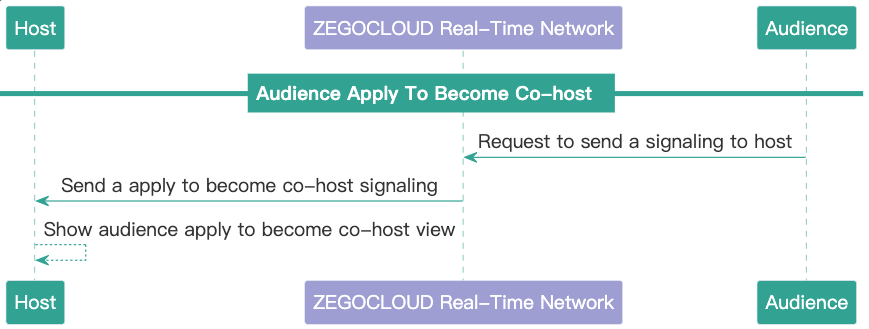
As shown in the picture, the audience applies to be a co-host, simply sending a signaling notification to the host.
- The audience calls the sendMessage interface to send signaling to the host, which to apply to become co-host. (Conversation type = ROOM, ZIMMessageType =Command 2)
- The host listens for co-hosting signals through onReceiveRoomMessage. When an audience applies for co-hosting, the host updates the audience’s status and displays a co-hosting request UI.
This method will send signaling to everyone. But in this feature, only the host and the audience who apply to become co-host need to process signaling, and other audiences ignore it.
Signaling Format
actionType:20011,
operatorID:"12312",
targetID:"123",
data:{
    "isApply": true,
}| Key | Type | description |
| actionType | Int | Signal type |
| operatorID | string | Operator’s user ID |
| targetID | string | Target user’s ID |
| data | dictionary | Updated data fields |
Audience cancels the application
As shown in the picture, the audience cancel applies to being a co-host, simply sending a signaling notification to the host.
- The audience calls the sendMessage interface to send signaling to the host, which to cancel apply to become co-host.
- The host uses the onReceiveRoomMessage method to listen to signaling. When an audience cancel applies for co-hosting, the host updates the audience’s status and dismisses a co-hosting request view.
Signaling Format
actionType:20011,
operatorID:"12312",
targetID:"123",
data:{
    "isApply": false,
}| Key | Type | description |
| actionType | Int | Signal type |
| operatorID | string | Operator’s user ID |
| targetID | string | Target user’s ID |
| data | dictionary | Updated data fields |
The host rejects the application
As shown in the figure, the host needs to use signaling to notify the audience when the application is rejected.
- The host calls the sendMessage interface to send a signal to the audience rejecting the request to become a co-host.
- The audience listens to the host’s response to the co-hosting request through onReceiveRoomMessage. When the host rejects the application, update user
isApplystatus tofalseand updates the view.
Signaling Format
actionType:20012,
operatorID:"12312",
targetID:"123",
data:{
    "isAccept": false,
}| Key | Type | description |
| actionType | Int | Signal type |
| operatorID | string | Operator’s user ID |
| targetID | string | Target user’s ID |
| data | dictionary | Updated data fields |
The host accepts the application
When the audience receives the host’s acceptance of the connection request, they need to turn on the camera and microphone and start pushing the stream.
- The host calls the sendMessage interface to send a signal to the audience, which accepts the request to become a co-host.
- The audience listens to the host’s response to the co-hosting request through onReceiveRoomMessage. When the host accepts the request, the audience needs to perform the following operations:
- Update user
isApplystatus to false. - Call the enableCamera and muteMicrophone interfaces to enable the camera and microphone.
- Call the startPreview interface to preview the camera video.
- Call the startPublishingStream interface to push the audio and video stream to the ZEGOCLOUD Real-Time Server.
- Update user
- The host and the other audience listen to the addition of the co_host’s audio and video streams through the onRoomStreamUpdate interface, and calls the startPlayingStream interface to subscribe to the stream.
Signaling Format
actionType:20012,
operatorID:"12312",
targetID:"123",
data:{
    "isAccept": true,
}| Key | Type | description |
| actionType | Int | Signal type |
| operatorID | string | Operator’s user ID |
| targetID | string | Target user’s ID |
| data | dictionary | Updated data fields |
Ready to start building with ZEGOCLOUD’s sdk? Click here to get 10,000 minutes for free.
Let’s Build APP Together
Start building with real-time video, voice & chat SDK for apps today!
